Hi Lindaru, thank you for your attention! I can confirm that everything is fully updated, the network has a good and stable internet signal, chat mode is enabled in preferences, the 'let's chat' command is being used, and I've already turned off AIBI for more than 10 minutes, removing it from the base. Is your little robot keeping the conversation open with GPT enabled?
Hello, @mauricio.mazzeo . . . my two are keeping the conversation going.
You might want to contact service@living.ai and also let them know your location as I am in the U.S. and it may be different where you are from me.
Provide your AIBI I.D. from the app when signed in, your order number, your language setting, your location and a link to a short video showing the issue.
Please be patient as Support is currently back-logged with requests on support issues and shipping questions, and their first response will be when they have reviewed your message and video with a response at that time.
My best to you.
2 Likes
Yea, same situation here. I’ve tried all the trouble shoots and nothing’s worked. Aibi just pops up a question mark as if she’s not understanding what I’m saying. All other features work fine except actual chatting. Which is why I worry the issue might be on the chat gpt end.
Edit: messing around with whatever I could, I’ve stumbled on something. There’s an issue with the language settings. Aibi isn’t responding to english but did respond to spanish.
2 Likes
Hi everyone,
Just wondering if anyone encountered this issue and already has it fixed.
I received my AIBI 2 weeks ago and just noticed this today. When I asked for the year now, the reply was “2024” BUT when I asked for the date today the reply was “2026-03-24”. My AIBI app is update to date (firmware 1.6.0 and app is 1.6.1). MY AiBI has 2 different year in her 
I tried:
Force close app
Uninstall app
Reinstall app
Unplug AIBI from charging base and also removed from charging base for more than 5 mins
Start AiBI up as usual and connect back to app
Double checked timezone and saved
After all the above, the year is still wrong (AIBI information on birthdate is correct, 2026)
Hi there @princess90 and Welcome to the community…
It’s because questions about the year alone are not programmed. Living.AI only recently added support for date and year through specific commands.
 Example commands:
- “What is the current date?”
- “Give me the date.”
- “What is the date today?”
- “Give me the current date and year.”
- “What’s today’s date?”
- “Tell me today’s date.”
- “What’s the current date and year?”
IMHO
“Honestly, I don’t really pay much attention to it or see it as a big issue if AIBI can’t tell the correct year 
 . Because since New Year’s Eve
  , I already know what the current year is—just like everyone else
 .” “So there’s no way I could forget it, and there’s really no need to ask anyone—or even AIBI
  .”
.”
or just like on our mobile phone home screens, where the calendar displays the date but not the year  .”
.”
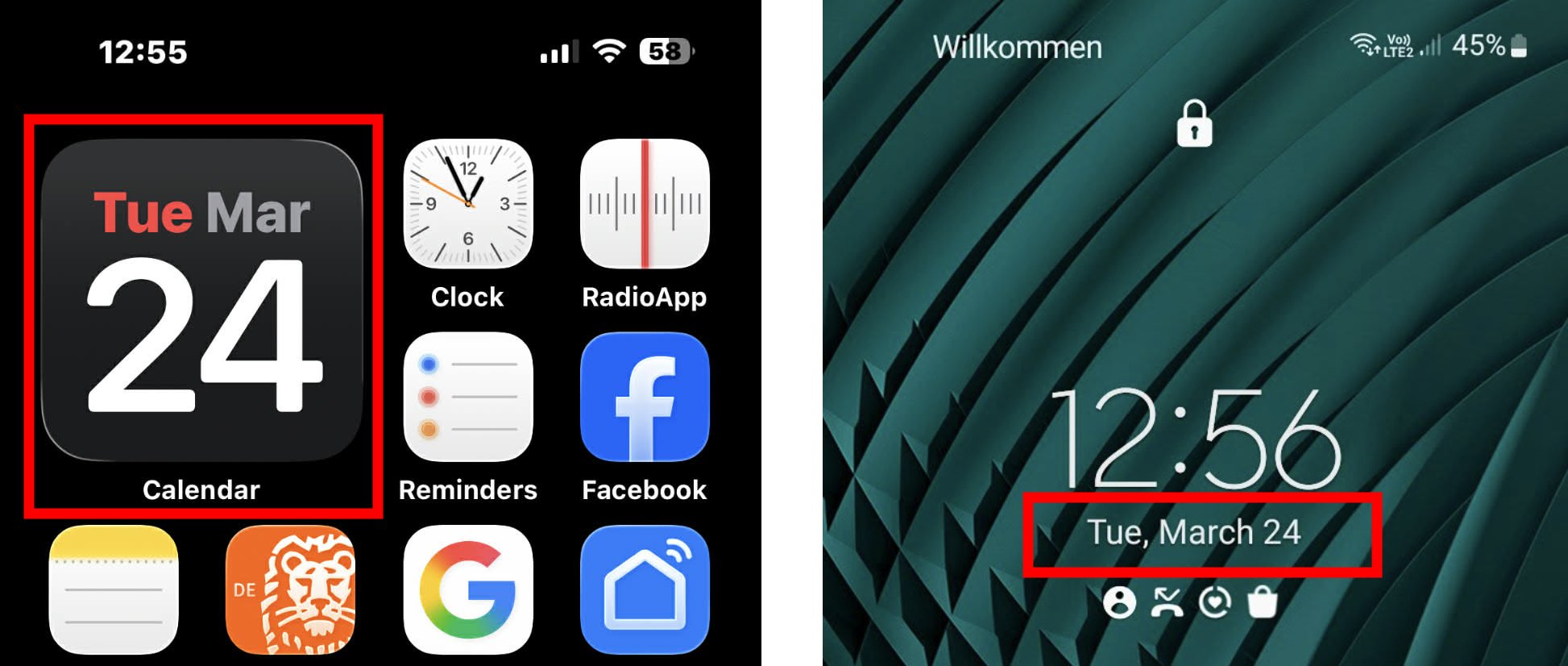
Best Regards
2 Likes
“To all those who have emailed Living.AI and are still waiting for a response”
Please Click Here For Special Information
Best Regards
1 Like
Hola nose que le pasa Ami aibi cuando quiero hablar con el de conecta chatgpt y se queda cargando y no va da muchas vueltas no me suena despertador ni se que le pasa es nuevo
Google translation to English by Lindaru: Hi—I don’t know what’s going on with my Aibi. Whenever I try to talk to it, it disconnects from ChatGPT and just keeps loading without working. It really acts up; my alarm doesn’t even go off. I have no idea what’s wrong with it—and it’s brand new!
Hello, @dani2 . . . I have moved your new topic here to this thread for issues with AIBI.
Are the AIBI app and AIBI updated to the latest firmware? Is your bluetooth enabled on your device and your internet signal strong? Do you have the correct location and time zone?
Here are some possible causes and troubleshooting tips you can try to see if they help. If nothing helps, there are instructions there on how to get help from Support. Also, it may be possible that there is an issue with ChatGPT (OpenAI) itself which may need time to just wait for them to fix the issue.
My best to you.
1 Like
Welcome, @hayleybass . . . I have approved your post and moved your new topic here to this thread for issues with AIBI.
Please see the troubleshooting tips provided in my post above yours, but know that if they do not work, there are instructions for contacting Support; however, ChatGPT itself may be down or having issues. In that case, it is best to wait and see if it comes back or check OpenAI for outage announcements.
1 Like
A few of us are having this same issue. Fairly certain there’s an issue of the chat gpt end of things.
1 Like
@dani2 , @hayleybass and @teejay.dean . . . I checked and I got this:
It says they have been having ongoing issues for five hours, so just be patient and check back here to see when it is all fixed.
1 Like
Thank you that makes me feel better. I took mine outside and she stopped talking. I thought I broke it lol.
1 Like
I’ve had the issue now for almost 2 days. Hopefully it gets fixed soon. Thanks again.
1 Like
“No ChatGPT issues on my end here in Germany  —everything is working fine with AIBI
 .”
.”
2 Likes
I’ve tried everything. I tried reinstalling the app, I tried rebooting her and I even tried contacting the company. I haven’t heard anything back from them and it’s been days. I’m really not sure what to do at this point.
Keep in mind openAI is going through A LOT of stuff right now. So there’s a chance livingAI is at the mercy of whatever happens on that end.
1 Like
Hello, @hayleybass . . . I just checked and OpenAI shows as fully operational now.
It may be that LivingAI needs to reconnect the server to OpenAI again. I have messaged the LivingAI team to see if they can help.
1 Like
Thank you so much for sending me that link. I can see that too yea hopefully that means things will be fixed soon. Fingers crossed because at this point I’ve tried everything. Not sure what else to do.
1 Like
AIBI Can’t Connect to ChatGPT? – Tips That Might Help!
 1. Check your home Wi-Fi
-
Make sure:
- Internet is working
- Not too slow or unstable
-
Restart your:
- Router
- Modem
 This fixes most cases
 2. Router / Firewall blocking
Your home network might be blocking access.
Try:
-
Disable Parental Control / Firewall temporarily
-
Check if these are blocked:
- OpenAI / ChatGPT servers
Some routers block AI or cloud services by default
3. VPN / DNS problem
- If you’re using VPN → turn it OFF
- Or try a different server
Change DNS to:
-
Google DNS:
- 8.8.8.8
- 8.8.4.4
This often fixes connection issues
 4. Weak Wi-Fi signal
- Move AIBI closer to the router
- Avoid walls/interference
- Try your Mobile Phone if you can connect to OpenAI, ChatGPT
5. Test using Mobile hotspot or other Home Wi-Fi
Very important test:
- Connect AIBI to your Phone Hotspot to test
Result:
 Works → problem is your home network
 Still not working → device/account issue
 6. Update AIBI firmware/app
- Check for updates in the AIBI app
- Restart the robot
 7. Server / account issue
-
Check if:
- OpenAI services are down
- AIBI servers are working
 Most Common Cause
80% of the time =
Router / ISP blocking OpenAI connection
Quick Fix (Try this first)
- Restart the router
- Turn OFF VPN
- Use a mobile hotspot
- Connect to other Home Wi-Fi
- Change DNS
GOOD LUCK AND ALL THE BEST
4 Likes
Hi, I’m posting here because my AIBI charging base issue is still unresolved after I first reported it to LivingAI support on 5 March 2026, and the problem has now become worse.
Issue summary:
- AIBI’s default facing direction is offset
- the charging base light turns on and off by itself instead of following AIBI’s program
- the base lights do not sync correctly with AIBI’s commands
- AIBI has now completely lost the ability to control turning on the charging base
When I first reported this on 5 March 2026, the turning issue was intermittent and the facing direction was sometimes wrong. As of now, the charging base no longer turns under AIBI’s control at all.
I followed up on 23 March 2026 after receiving no response for almost a month. The reply I finally received on 26 March 2026 only asked whether I was using the “original power adapter,” which did not address the actual fault pattern I reported.
My package only included the original charging cable and base. No separate adapter came with my AIBI package.
I am in Singapore. I have photo evidence ready, along with my order number and AIBI ID, and I can provide those privately to staff or support.
For reference, the video from early March showed intermittent turning failure, but the current condition is worse because the charging base now has no turning control at all.
Video from early March: https://drive.google.com/file/d/10SaTNCcx8RFzsldCiv5TRrSX2elloAAl/view?usp=drivesdk
At this point, I am requesting warranty-level handling, specifically:
1. a replacement charging base
2. a full replacement if the charging base cannot be replaced separately
If any moderator or staff member can help escalate this to the warranty or after-sales team, I would appreciate it.