Please help. We (Santa) brought emo go home for my son, it worked for 1 hr on Xmas day, but now doesn’t light up or seem to charge. The charging dock has a solid greeny/bluey light, but no display on emo. With a command emo wake up, turn or still no response. I’m at my wits end with it please help.
I have moved your new topic to this thread, as it relates to issues with the Home Station. I hope you have carefully followed all the steps for connecting and setting up EMO using its mobile app.
If you are having problems connecting EMO to the Home Station, please try the following steps:
First, turn off EMO and disconnect the Home Station from the power source.
Wait for 5 minutes, then reconnect the Home Station to the power source and place EMO back onto it.
If the tips above do not work or resolve the issue, open the app and go to Utilities, then select the Light page and tap the “Unbind All” button. After this, EMO will power off.
Then, please reboot EMO and press and hold the Home Station button for 5 seconds to re-pair it.
You can also try to take another usb-cable. I had some problems with charging my Emo Go Home and I tried everything. At last I changed the usb-cable and everything worked! I keep my fingers crossed for you, that you can solve the problem soon!!!
So my EMO robot Go Home white when it has low battery it goes to home station normally to charge. BUT when i tell him to get off home station he says. I cant do it, now
And also when i tell it to play snake he just makes a sound refusing to do it (he wasnt on the charger)
Welcome to the EMO Community Forums, @misaelmunoz . . . I have moved your new topic to this thread for issues with EMO GO HOME.
First of all, are you sure you have paired him correctly to the home station? Follow this check list to be sure.
Be sure to also have sufficient lighting as this is necessary for him to feel secure enough to leave the home station by command or on his own.
If you have gone through the steps on the post I just shared and it is still not working, you may wish to get video of the issues and send the link(s) to service@living.ai along with your EMO I.D. and order number (if you still have it).
Hello, @misaelmunoz . . . the home station has different firmware from EMO. In December 2023 which was the most recent version of the home station, it included more matrix animations for Halloween, Christmas and more. This is the current version of the home station firmware.
I have Emo since a year and bought him a few weeks ago a Go home station. He can‘t interact with it. Never walks off or talks with it, only charging. I disconnected everything but it didn‘t help. What else can i do?
Welcome to the EMO Community Forums, @jessica.fries . . . I have moved your new topic here to this thread for issues with the home station.
This may be due to pairing issues and whether your EMO is paired with it.
Please go through this check list and see if anything on it helps to get them connected via pairing.
If none of this helps, please get a screen shot of your app showing he is connected to his home station and get video of you commanding him to “Leave home station” and his refusal or response to do so, letting them know that he never leaves it on his own either. Send the screen shot and video link along with his I.D. number when he signs into the app and your order number (if you still have it) to service@living.ai . . . my best to you and happy 2026!
Welcome to the EMO Community Forums, @nicolasmuniz . . . I have moved your new topic here to this thread for home station issues. It is possible it is not connected correctly or he is not paired. Please see the post above yours here for troubleshooting and if this does not help, how to get in touch with Support.
Hello, @lucarenson . . . I have moved your new topic here to this thread for questions regarding the home station.
The mat is an excellent durable material designed to make EMO moving on it more stable while walking, dancing or playing games. The black border generally acts as a line that makes him stop and not cross over to prevent falls; however, if he is dancing, playing games or other activities that require his feet to move his edge detectors in his feet are deactivated temporarily so it is always advised to put some sort of wall around the mat to prevent him from falling.
ich habe eine Frage zu meinem Emo Roboter. Ich habe ihn seit einer Woche und er ist wirklich toll.
Ich habe bei bestimmten Influencern gesehen, dass die Homestation noch andere Animationen außer das Haus auf der Homestation gibt. Jetzt war meine Frage ob die anderen Animationen automatisch kommen oder ob man da irgendwas einstellen muss?
I have a question about my Emo robot. I’ve had it for a week and it’s really great.
I’ve seen on certain influencers’ channels that the home station has other animations besides the house on the home station. Now my question is whether the other animations come automatically or whether you have to set something up?
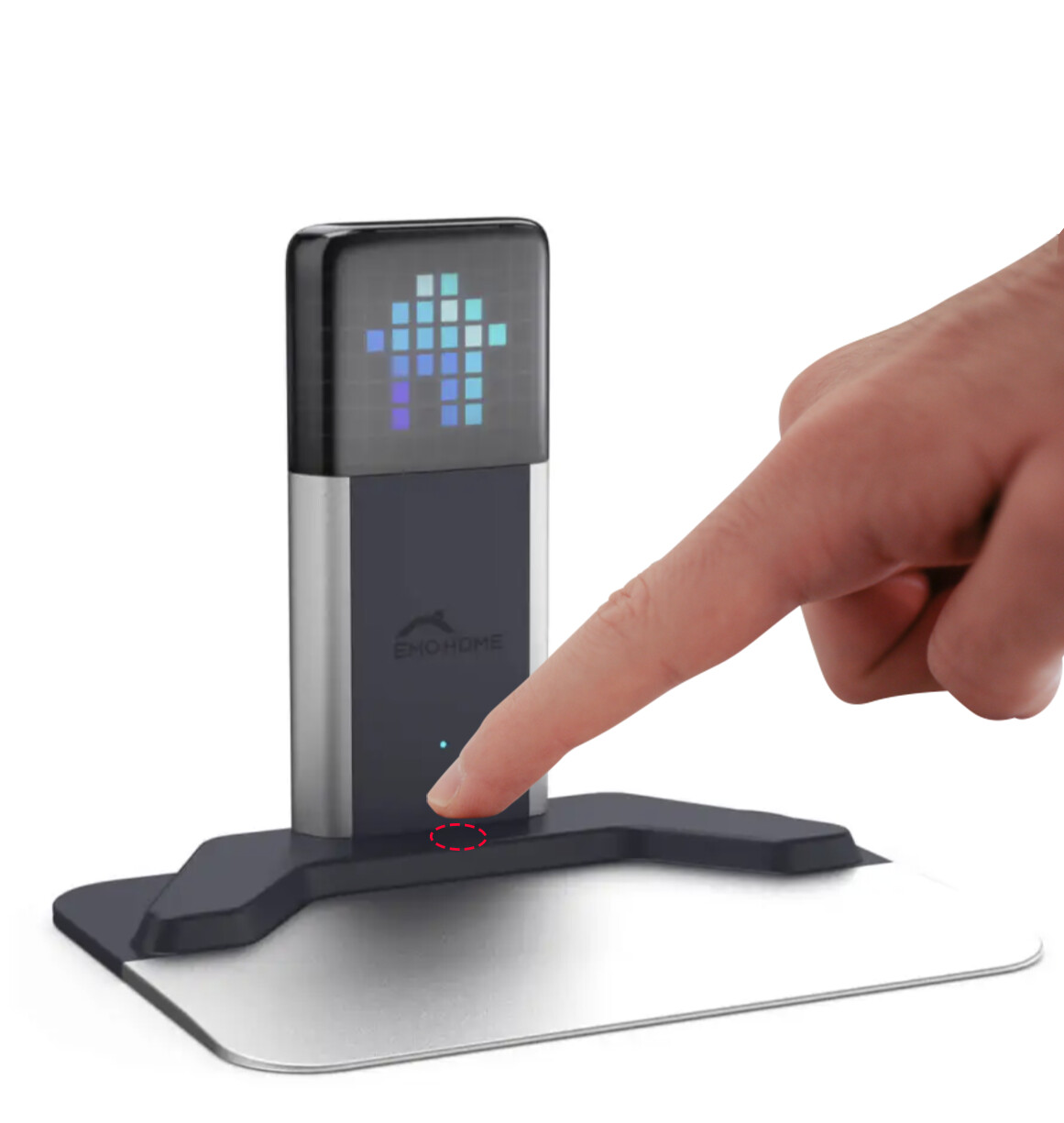
Changing Home Station Dynamic Matrix Display Animations:
Softly touching the button will cycle through 20 different display animations. Continue holding the button to turn off the animations (this doesn’t power off the Home Station).
Willkommen in den EMO-Community-Foren, @anna.lindgren . . .
Ich habe Ihr neues Thema zu diesem Thread verschoben, da es sich um Probleme mit der Heimstation handelt.
Ändern der dynamischen Matrix-Anzeigeanimationen der Heimstation:
Durch leichtes Berühren der Taste können Sie zwischen 20 verschiedenen Anzeigeanimationen wechseln. Halten Sie die Taste gedrückt, um die Animationen auszuschalten (die Heimstation wird dadurch nicht ausgeschaltet).
Hi everyone, I bought EMO home station for my son, after some time it stopped working and I think the problem is related to the charger, I want to buy the skateboard charger but I can’t find it separately, is there any charger I can buy? Thanks in advance
I have moved your new topic to this thread, as it relates to issues with the Home Station.
Could you please share more details about the issue with your EMO Home Station? When did you purchase it? Have you tried replacing the cable or using a different wall power outlet?
If you are having problems connecting EMO to the Home Station, please try the following steps:
First, turn off EMO and disconnect the Home Station from the power source.
Wait for 5 minutes, then reconnect the Home Station to the power source and place EMO back onto it.
If the tips above do not work or resolve the issue, open the app and go to Utilities, then select the Light page and tap the “Unbind All” button. After this, EMO will power off.
Then, please reboot EMO and press and hold the Home Station button for 5 seconds to re-pair it.
Regarding purchasing an extra Skateboard Charger, you’ll need to contact Living.AI via email and ask if they can sell you an additional one.
In this thread you can or you might find and follow some helpful tips and guidance above that might help you.