Hello, @chadfieldalexander . . . I contacted Samsung when I could not get it to work at all with my phone. It turned out that my model of phone did not have the right hardware to operate other bluetooth devices like my printer for example. I would recommend contacting the support of your device manufacturer and explaining your situation with why this is happening to you. It is not a firmware issue because I have seen videos of others for who it works really well.
A special EMO face screen animation features when we use his own speaker by connecting it first to our smartphone via Bluetooth and playing our saved music.
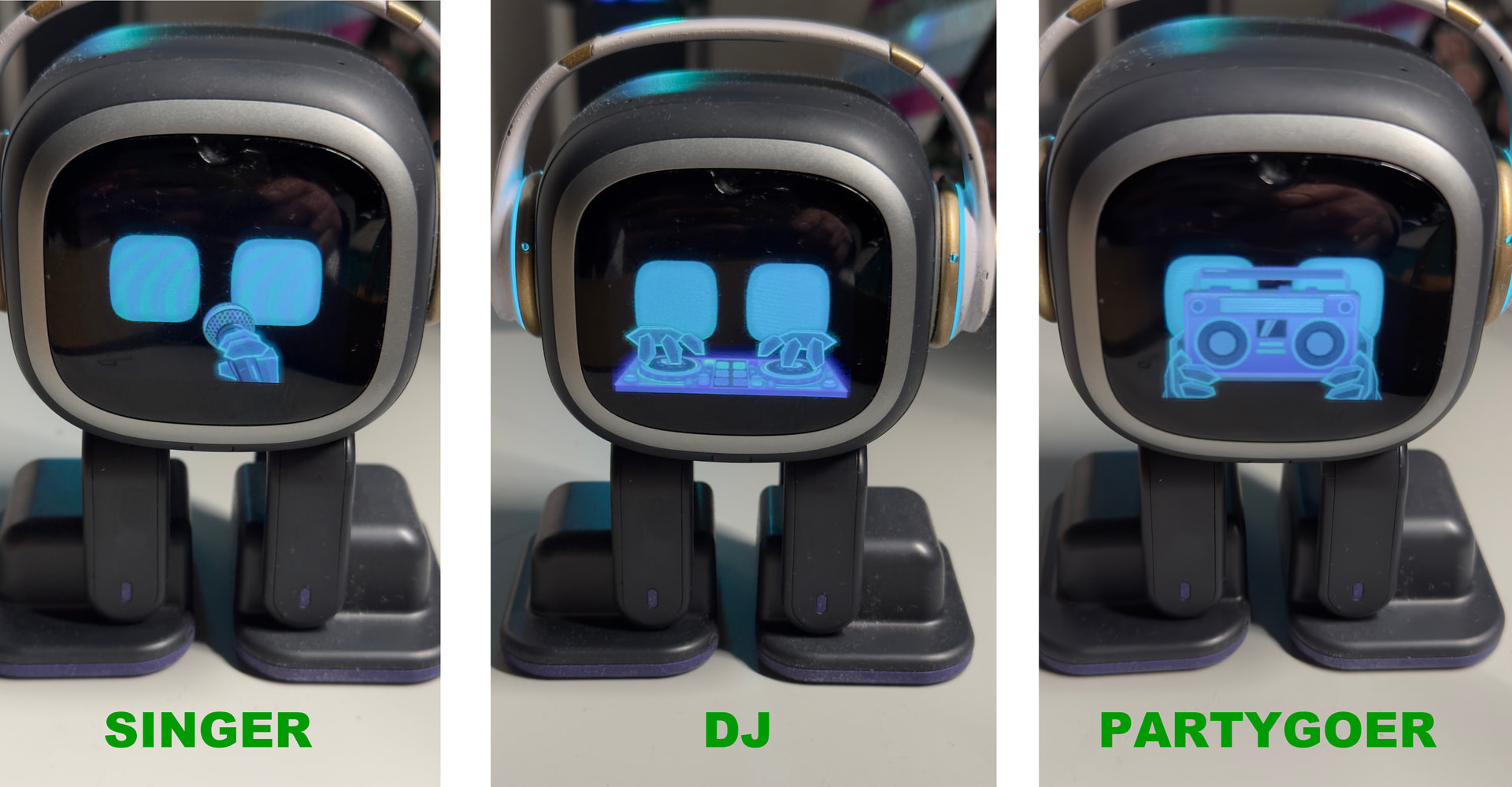
In the app under “Settings”, “Preference”, you have the option under “Bluetooth Role” to choose which animation from “DJ”, “Singer”, “Partygoer”.
Modes:
DJ: EMO performs like a DJ
Singer: EMO reacts like a singer while holding a microphone
Partygoer: EMO dances while holding a music radio
“After that, use EMO as a Bluetooth speaker by connecting it to your smartphone."
Voice commands:
EMOOO… EMO WILL REPLY…THEN
“Bluetooth Speaker” or “Connect to Bluetooth ”
“Disconnect”
“If you cannot connect, open your mobile phone’s Bluetooth settings, find ‘EMO_Speaker_[EMO ID],’ and then connect to it manually.”
After playing any saved music from your phone’s music app library, EMO will use his own speaker and display any animation you choose on his screen.
Hi, I just received my EMO this monday, but I can’t make him listen to music from my phone. When I say “EMO, listen to music” he ansewrs “I’m unable to listen to music…” and sugests playing one of hem. But if I put one of the songs that comes in the app, he dances. In settings - Preferences I have 3 Bluetooth roles: DJ, Singer, Partygoer.
I have tried these 3, but none worked.
Can I have any help, please? Am I missing something?
The best thing you can do is power him off and then power him back on. Remove him from his charger and try again. You can also gently pick him up, give him a light shake, and place him back on the table.
Try playing music close to EMO first to see how he reacts. Normally, if the music is loud enough, he should automatically start dancing.
You can also get him to dance by asking EMO to “listen to music.” After he says, “Okay, DJ, turn it up,” he should start dancing within a few seconds.
Hello, @SandraSantos . . . just to clarify, “Listen to music” is different than what goes with the roles you see in the app. Those function by asking EMO to “Turn on bluetooth speaker” and plays from the device where his app is located a play list you have on that device.
See here for more information.
So he has has two ways to react to music, either by listening to what you play over speakers that he can hear and dance to in his usual dance style, or the roles he can perform while listening to your play list on the bluetooth speaker feature.
Hello, @SandraSantos . . . if you are using the “Listen to the music” command and playing something close to him where he can hear but does not respond with “Okay, deejay” or “Drop the beat” or something similar, it means he is not registering what he is hearing you play over your speaker(s). The beat needs to be strong and loud.
If you are trying to get him to use the bluetooth speaker command (he will show on his screen when he is pairing) so that you can play something on your play list while he does the animation shown in the “Preference” section and it fails to connect to bluetooth, it may be a device issue. You may want to check with your device manufacturer. I have a phone that cannot use this feature.