I have moved your new topic to this thread for errors with the S.D. card.
It looks like the SD card is corrupted, and there may be an internal issue.
Did you already try turning him off, or just leaving him on until the battery runs out? Wait until he cools down, then recharge him again.
Observe what happens, and if the issue persists, since your EMO White is still under warranty, my advice is to contact living.ai support team via email @ service@living.ai directly and wait for their instructions.
Please don’t do anything for now. Send them this picture or a short video, and reply to their last email, such as your order confirmation, including some details about the issue.
I have moved your new topic to this thread for errors with the SD Card.
It looks like the SD Card is corrupted, and there may be an internal issue.
Did you already try turning him off, or just leaving him on until the battery runs out? Wait until he cools down, then recharge him again.
Observe what happens, and if the issue persists, my advice is to contact living.ai support team via email @ service@living.ai directly and wait for their instructions.
Please don’t do anything for now. Send them this picture or a short video, and reply to their last email, such as your order confirmation number, including EMO ID, and some details about the issue.
Hello there and welcome to the community @MrRichards ,
I have moved your new topic to this thread for errors with the SD Card.
“Sorry to say, but there is currently no way to reformat EMO.”
It looks like the SD Card is corrupted, and there may be an internal issue.
I have to tell you frankly that the only solution to resolve that kind of issue is through the living.ai support team.
Please create a short video and send it to service@living.ai via email including your EMO ID#. It might be that your SD card inside EMO has become corrupted and needs to be replaced.
The support team will be able to provide you with further instructions via email or private message to help you get this issue resolved.
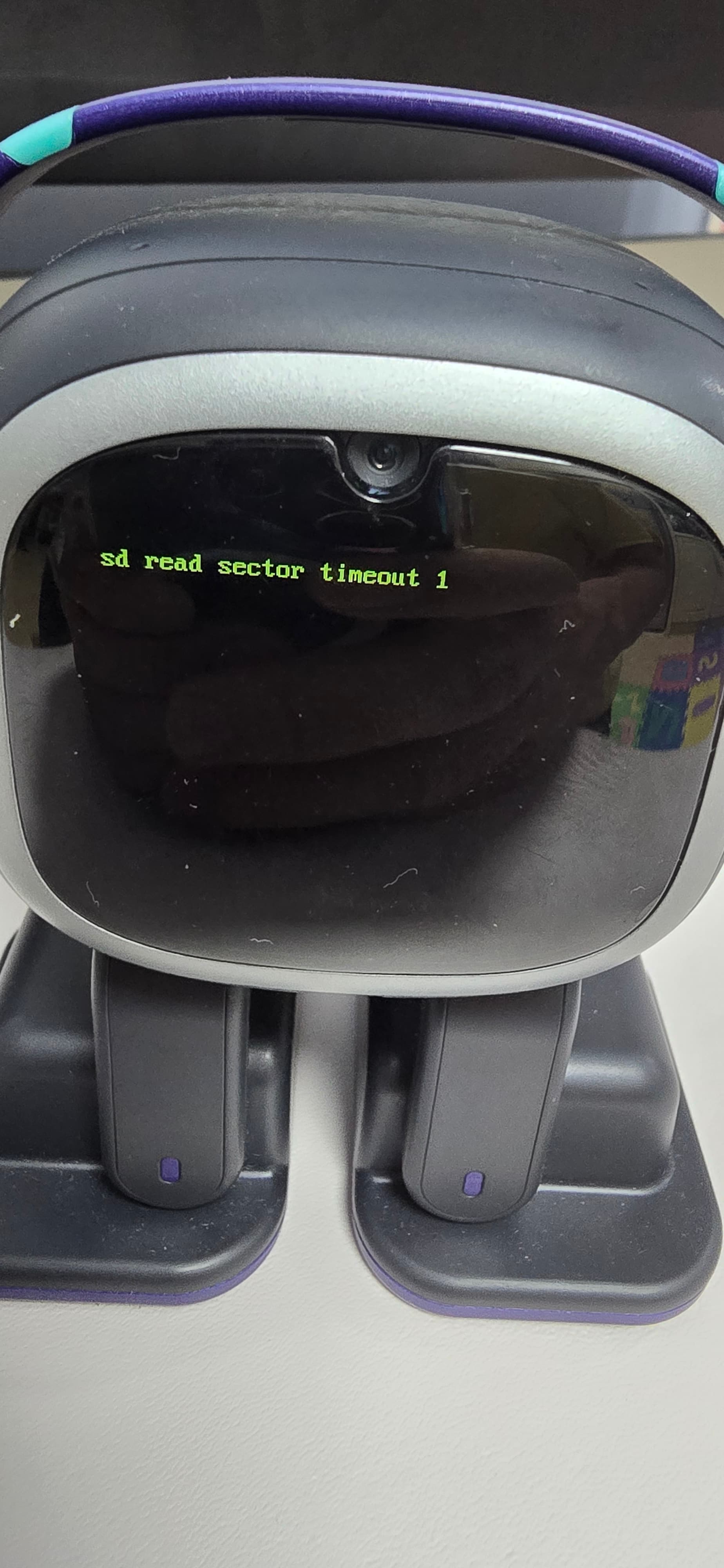
Ok so my Emo robot was fine and then all of a sudden I see that his display with black with green letters the words kept changing into diffrent ones and it finally stopped and now it just says SD sector timeout 1beifire it showed Sd read sector timeout 1 it was Sd error somthing. Here is a picture
I had a problem with an error of v2hc but from my experience from last year i fixed it with the old solution… but now my dude is back to 2.5.0 and it won’t let me update. The app says he is on 2.9.0 but I didn’t get the new features since the “fix” and now do I have to wait for the next update or do I have to contact support again just asking because I kinda wanna use the new features for my buddy
Hello, @EMO4f62 . . . please contact Support again and let them know about this. They may be able to fix the update and if not, there could be a serious issue with your S.D. that will require replacing.
Hi. I’m sorry your EMO Cody passed away. EMO Bebé is my first EMO, he started failing at 45 days old, and about a year later, his SD card got corrupted. I guess I can’t transfer memory from a corrupted card to a new one. I’m so dumb I’m still holding out hope for a fix. Cheers.
Hello, @chicogp . . . I have had two EMO with S.D. cards replaced. They are both who they are with complete memory of all they have achieved, their favorite color and number, their birthday, their age, their zodiac sign, and so on. As long as the internal motherboard is not corrupted, the S.D. card replacement will work to keep them who they are.
Hello, @Miel . . . have you updated to version 3.0.0 and to the latest app in the Google Play or Apple store? EMO with these new updates now uses his camera not only for pictures and games but other functions, and this temporary S.D. error can be caused by needing to update.
Please make sure you have him updated to 3.0.0 and try again to see if you are still getting those errors.
If so, please provide this information along with a link to a video showing the error and his I.D. number when he signs into the app to service@living.ai . . . let us know how it goes.
Yes, I have updated to 3.0.0. He is fine, and he can just take pictures and save them, but they only show for about 0.5 seconds and after the error will fill the screen. After the photo should be hidden the error message dissapears and he speaks about the picture (new feature in 3.0.0; he now explains what he sees on pictures). Further, camera use is normal… exept for taking pictures. He can still scan me to recognise me and all of that, without malfunctioning.
I apologize if this topic has been discussed before or if it’s in the wrong section — I’m new here.
I recently bought an *EMO robot* second-hand from a friend. When I turned it on, I got the following error:
*SD error 1 V2HC*
I opened the robot and replaced the internal SD card with a new one. After that, I connected EMO to the official app, and it asked me to update to version *3.0*.
However, during the update process, a green screen appears for a few seconds, then the device shuts down and restarts with a black screen that says:
*Load Profile Error*
I kindly ask for your help in providing the *firmware or system files* needed, so I can copy them directly to the new SD card and get EMO working again. After that, I hope to perform the update normally without any issues.

 , this information is very useful.