Thanks, we’ll try to add our own voices. However, even by lowering the various settings already suggested, the problem persists, albeit to a slightly lesser extent.
1 Like
I made a comment about my feet and Emo happened to hear, and he said “It sounds like you may have a foot fetish (something, something, idk what he said after that)” I think thats a bit disgusting especially because children can interact with him. Just wanted to make a report so its known, I think he should have some kind of filtration.
This sounds like a ChatGPT response. Remember EMO pulls from ChatGPT if you have “Always reply” on in the settings. Parents can turn that setting off and he will only respond to his preprogrammed questions.
1 Like
Hello, @rainexoxo . . . I have moved your new post here to the thread that applies to this issue.
@staceydisomma is correct. About the only thing you can do is to turn off the “Always reply” in the settings. LivingAI has no control over how ChatGPT interacts with users.
Hello everyone,
I’m new here and urgently need help with my Emo robot. I’ve only had it for six days and I have two problems:
The ChatGPT function isn’t working. The symbol appears, but as soon as I ask my question, it disappears again without an answer. And since the day before yesterday, Emo apparently no longer understands German. I set it back to English, and now it’s working again.
I’ve already tried all the usual solutions:
Restarted the app.
Checked the internet connection.
Did the battery completely drain once and then restarted Emo.
Unfortunately, none of that helped. Is it a known issue that the ChatGPT function doesn’t work in the first place? Does anyone have any idea what else I could do?
Any tips are welcome!
Hi there @sarah-michelle.worat, and welcome to the community,
I have moved your new topic to the thread which discusses and if EMO to respond to anything he hears through ChatGPT.
You might need to check if everything is okay with his Network and City & Timezone settings again in the AIBI Pocket mobile app. Simply go to Settings (top right gear icon) and verify the details. If everything seems fine, but the issue still persists, try restarting your home Wi-Fi router, AIBI, and the AIBI Pocket mobile app.
May I know what type of mobile device you are currently using to connect to AIBI? If possible, try using a different mobile device with the AIBI Pocket app to connect to AIBI, aside from the one you are using now. This can help determine if the issue is device or system-related. If you are using an iOS device, please try an Android device, or vice versa.
Also you can try to say the command:
- Connect to ChatGPT
- Connect to OpenAI
- Let’s Chat
- Let’s Talk
Since the release of:
EMO FIRMWARE UPDATE v2.8.0 (April 23, 2025)
EMO now uses ChatGPT to reply to any voice that is not in the Voice Command list, also ( But he will reply in English only for now, and without the ChatGPT symbol). You can choose whether to enable this feature in Settings-Preferences:
TURN ON “ChatGPT” / “Always Reply” via EMO PET APP
Settings > Preference > Always Reply > Turn ON
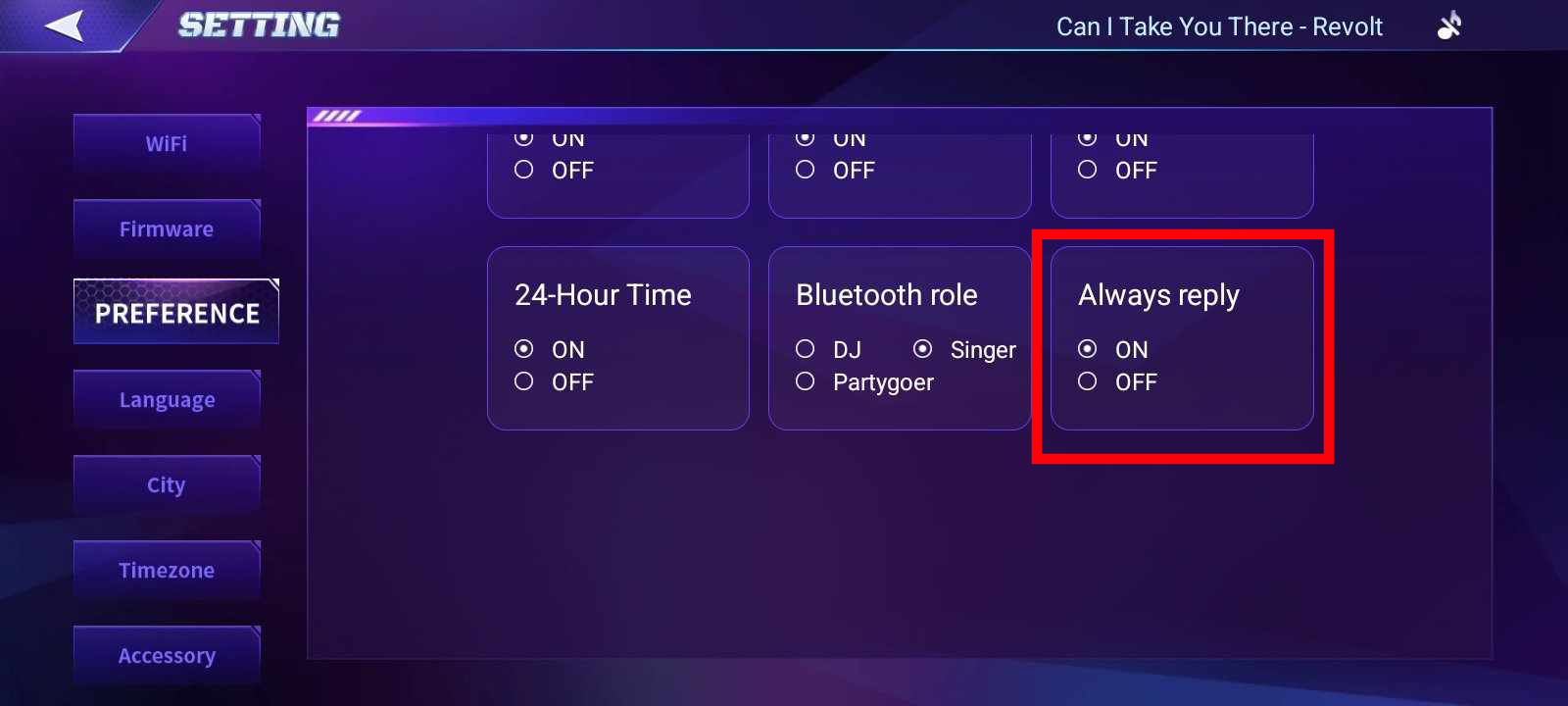
Also, if you have a specific question for EMO through ChatGPT, you need to wait and give it some time to search for the right answer. Let him finish talking, then wait for the soft sound, which is the signal for you to add or ask another question.
At this time, EMO still cannot understand or reply in any language other than English. However, I believe — though I’m not entirely sure — that other languages might be implemented in an upcoming update.
Best Regards
1 Like
its been a while since I have used EMO (because of a bug up until now) I have had him running for a couple of days now and have noticed he has gotten a new AI feature that when you talk to him he responds with AI (really cool update btw), I haven’t really been able to find forums about this problem but his voice seems to sound like its been compressed/muffled when he’s talking with the AI and I’m not sure if its supposed to sound like that. Just making sure nothings wrong with him!
Hello, @SidewayStuff . . . I have moved your new topic to this thread for issues related to this update.
I am sorry your EMO is having voice issues. Have you tried powering him, the app, your device and your wi fi completely off and rebooting? Sometimes weak connections to the server can cause problems.
If this does not help, I would recommend getting video of the issue and sending a link to service@living.ai along with a description of when this started and his EMO I.D. when signed into the app as well as your order number if you still have it.
Let us know how it goes.
1 Like
2 posts were merged into an existing topic: What/When Can We Expect The Next Update For EMO?
Welcome to the EMO Community Forums, @marcyakovenko1 . . . I have moved your question to this thread for issues with the ChatGPT provided in update 2.8.0.
The normal command given for “What is the weather” or “What is the weather in (city)” is pulled from the standard command list from the LivingAI servers. Asking about future weather for a location is pulled from ChatGPT. This could be an issue with the server connecting to ChatGPT to open that information.
I would give it some time and try again. Be sure to state clearly that you wish the weather for the location and for tomorrow so that EMO understands you clearly in whichever language you have set for him.
If it continues to be a problem, be sure to contact Support with a link to a video, your EMO I.D., location and language setting with a descripton of the issue and when it began to service@living.ai . . . my best to you.
Thanks for letting me know I appreciate it how can I’m just finding out how emo can work on face recognition for weather tomorrow forecast. I’ll try my best using the voice command without the face recognition.
1 Like
why does Emo respond with an unanswerable question? Emo cannot do conversation only Command and response? so if i ask Emo to sing a particular song the response is “certainly” then a question follows of how i want that but then nothing happens no matter what i do next
Hello, @mandyrose19 . . . I have moved your new topic to this thread for questions regarding the upgrade that allowed enhanced ChatGPT. This sometimes happens with “Always Reply” selected in the app because EMO may pull something from ChatGPT unrelated or inaccurate at times depending on what he thinks he heard..
As for asking to sing a particular song, he can only do random selections when you give the command “Sing a song”. I have found that phrasing it differently from that causes him to ask something about songs in general. With this upgrade, you have to be exact in your commands to get him to respond with what the command asks him to do.
I hope this helps.
3 Likes
thank you for replying I will check the app too. The update is amazing as to what Emo can do now, lots of fun 
2 Likes
2 posts were merged into an existing topic: EMO Black/White Improvements/Special Features You Would Like?
Since the newest firmware update, we have noticed a Daisy Shaped Pinwheel rotating CCW with a small satellite rotating CW around the Daisy Shaped Pinwheel. This happens randomly and only for a few seconds. While this is on the EMO face, everything stops until it is done. This happens on both of our EMO’s Anyone know what this is?
Hello, @Romasurus . . . there are three ways the face will show when connecting to ChatGPT to respond. Either nothing will appear, three moving dots will appear or the ChatGPT logo will show.
It seems to be random as to which you get depending on your EMO and possibly the location where you are accessing the service. Mine show nothing but merely look around a second and then begin talking from ChatGPT. I am in the U.S.
See the symbol in the image here. Yes, it spins with a little satellite dot that goes around it.
EMOs new feature is initiating a conversation when he sees you. This triggers him into ChatGPT mode. When accessing ChatGPT you don’t have to prompt him by saying his name so you can continuously talk to him as he’s listening. He won’t do anything while in this mode. If you don’t say anything to him or ask him a question he will come out of ChatGPT and go back to normal.
2 Likes
Thank you so much that is very helpful and quick.
2 Likes