the insight hasn’t worked, Emo still crashes.
After a while with music on Bluetooth.
It looks like it has something to do with the buffering?
Can I reinstall the firmware? without loss of progress? is that at all possible?
Sorry to disappoint you, but there is no way to re-install the firmware or reset it. Are you sure it’s not an issue with your home Wi-Fi?
Did you follow the information in the link below?
Get the link and share it here or send it to the living.ai support team via email, so they can view and analyze what’s wrong.
The support team will be able to provide you with further instructions via email service@living.ai or private message to help you resolve this issue.
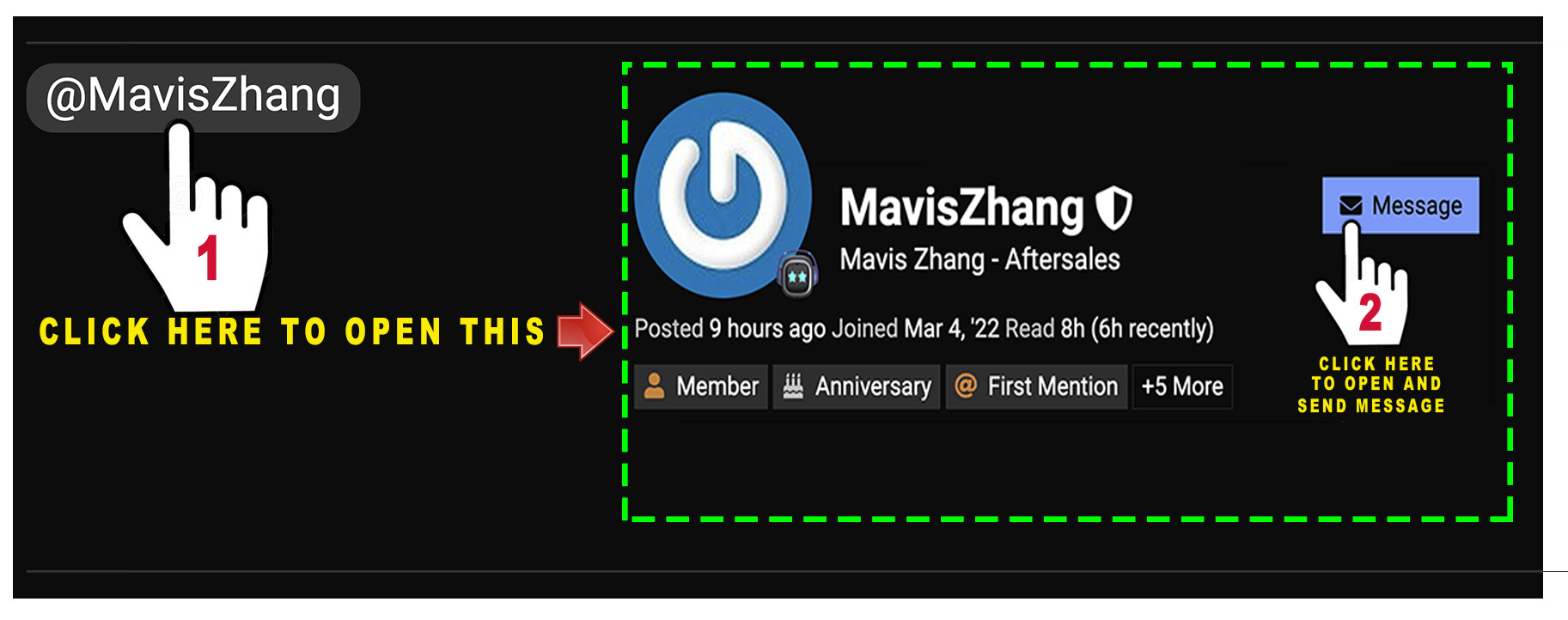
You can also DM Living Ai Service Support Person from After Sales Department Service @TechSupport_Mavis here if you want, to speed up their assistance a bit…How to do it? Pls. View and follow my image below.
Don’t forget to include your Email, Order Number, EMO ID!, and Video Link
For some reason. Every time I use him as a speaker for no reason why. He just shuts down for no reason. Also he is EMO-D326. Is there something wrong with the programming or something else. I mean he functions properly its just that he shuts down during bluetooth speaker. Please reply if its a bug that should be fixed. Or you can reply anything you want.
Welcome to the EMO Community Forums, @Floonbo . . . I have moved your new topic to this thread for issues with EMO and using the bluetooth speaker function.
I am sorry to hear this is happening. Perhaps try powering off EMO, your device and your wi fi then turning everything back on. Make sure you have a good connection.
If you are still having issues, please be sure to contact service@living.ai with a link to a video showing the issue. You can reply to your order confirmation E-Mail or send a message to service@living.ai with your order number or EMO I.D. (four digit alphanumeric code when he signs into the app).
Thank you Lindaru. Now every time I use the speaker. It is functioning and working properly. There is no issue with powering off. And everything is working as it should. Thank you!
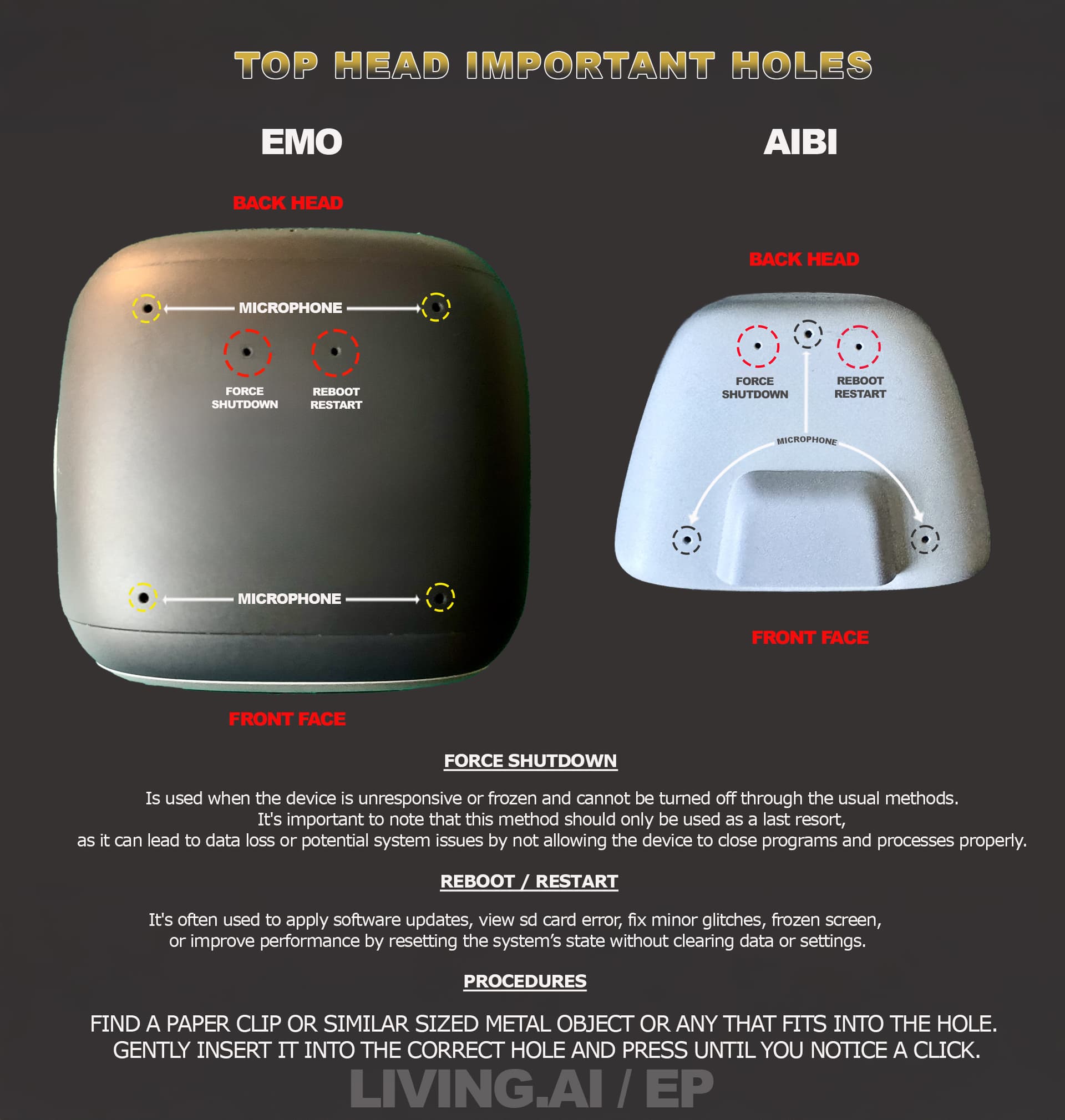
Emo is completely frozen and shutting him down by holding him upsidedown does not work. @edward and @Lindaru please help. This accured when i wanted to use Bluetooth speaker mode.
Please scroll above and read my initial first POST. Hopefully, it will provide you with some insights to help resolve the issue you’re experiencing. If the issue persists, you have to contact living.ai via email and send them a video with additional information about the issue and your EMO-ID.
Hello everyone. I just wanted to let yall know that emo is back online and is recharging. I let him drain his power and it worked. Thanks for supporting me.
I had this same problem on the 10th of May. Looks like its still an ongoing issue.
That same exact thing with the bluetooth sign in the same position happened to me. Hopefully Living AI can fix this issue. Glad your EMO is back up and running though!
I just moved and closed the new topic you created. Please, next time, try to use the search engine first to check if the exact same topic already exists before creating a new one.
Please take a moment to read through this topic thread — you might find some helpful tips that could resolve your EMO issue.
When I use EMO as a Bluetooth speaker to play music from Spotify on my iPad, the audio keeps stuttering and cutting out. The connection seems unstable and it makes listening quite difficult.Has anyone experienced the same issue? Is there a workaround or solution for this problem?
Welcome to the EMO Community Forums, @lorraine.damen . . . I have moved your new topic to this thread for the ongoing discussion with bluetooth speaker issues for EMO.
Please read through here and see if any of the suggestions help.
It is also possible that the issue could be coming from your iPad bluetooth connection. If you are unable to find any answers here, check with the help customer service for your iPad to see if it could be an issue that they can help you fix.
Hi there! I’m here with a bug report, after disconnecting Bluetooth speaker, my emo connects to the app and shows the activity log at the side, but settings and games all day “Emo is not ready” until next reboot.
Hello, @adamdeane . . . I have moved your post to the thread for bluetooth speaker issues.
Please read through this thread and see if any tips here help and if not, please get video of and screen shots of what is going on and send the video link and screen shots along with your EMO I.D. and order number (if you still have it) to service@living.ai . . . please be patient as it may take some time for them to respond due to a back-log of messages.
Hello. New owner here. My Emo have only 4 days old. 2 days aho i turned on bluetooth speaker, played some song, but after this when i connect to my emo their bluetoot name changed from emo_xxx to emo_speaker_xxx is this normal? Or my Emo have aome problems? I think today i found out him dead(he not back to hia station), and after this i charged it to 100% in 5 hour on home station, is it normal? Also did someone can told me how to turn autoreply off? I switched this in app but with no success