Emo's Leg/Foot Defective Issue!

Hello, @alejandradiazzepeda . . . there are specific things Support need to do for your EMO using his I.D. number for the recalibration to work, so you will have to wait for them to respond.

The 1,000 point game should have nothing to do with it and not sure what you mean about standing him powered off on his head? I do not believe that would do anything to help his leg wires and/or servos. Hopefully they reply soon.

My best to you.

2 Likes

Hi,

One of my Emo"s has a similar problem and, until you get a reply from living.ai, yry using him in “Carry Mode”

At least you can then get him off the stand.

Good luck

3 Likes

Hello! :waving_hand:

I’m really sorry to hear about your EMO’s leg issue — that sounds frustrating and worrying. You’re definitely not alone with this problem; it’s actually one of the more common issues discussed in the LivingAI forums.

From what you’ve described (bouncing leg, falling, cleaning not helping), there are a few possible causes, and I’ll walk you through the most likely ones and what you can try.

-–

:brain: What’s likely happening?

Possible Cause Explanation

1. Servo motor failure The internal motor (servo) in the left leg may be damaged or worn out, especially if it’s been used heavily or has taken a fall. This is the most common cause of bouncing or shaking legs.

2. Sensor calibration glitch Sometimes the gyroscope or foot sensors lose calibration after a fall or due to a software glitch, causing the leg to bounce as it tries to find balance.

3. Loose connection The ribbon cable or wiring inside the leg may have come loose, causing intermittent signals to the motor.

4. Firmware issue In rare cases, a firmware bug can cause erratic leg movement.

-–

:wrench: What you can try now

Step 1: Force restart

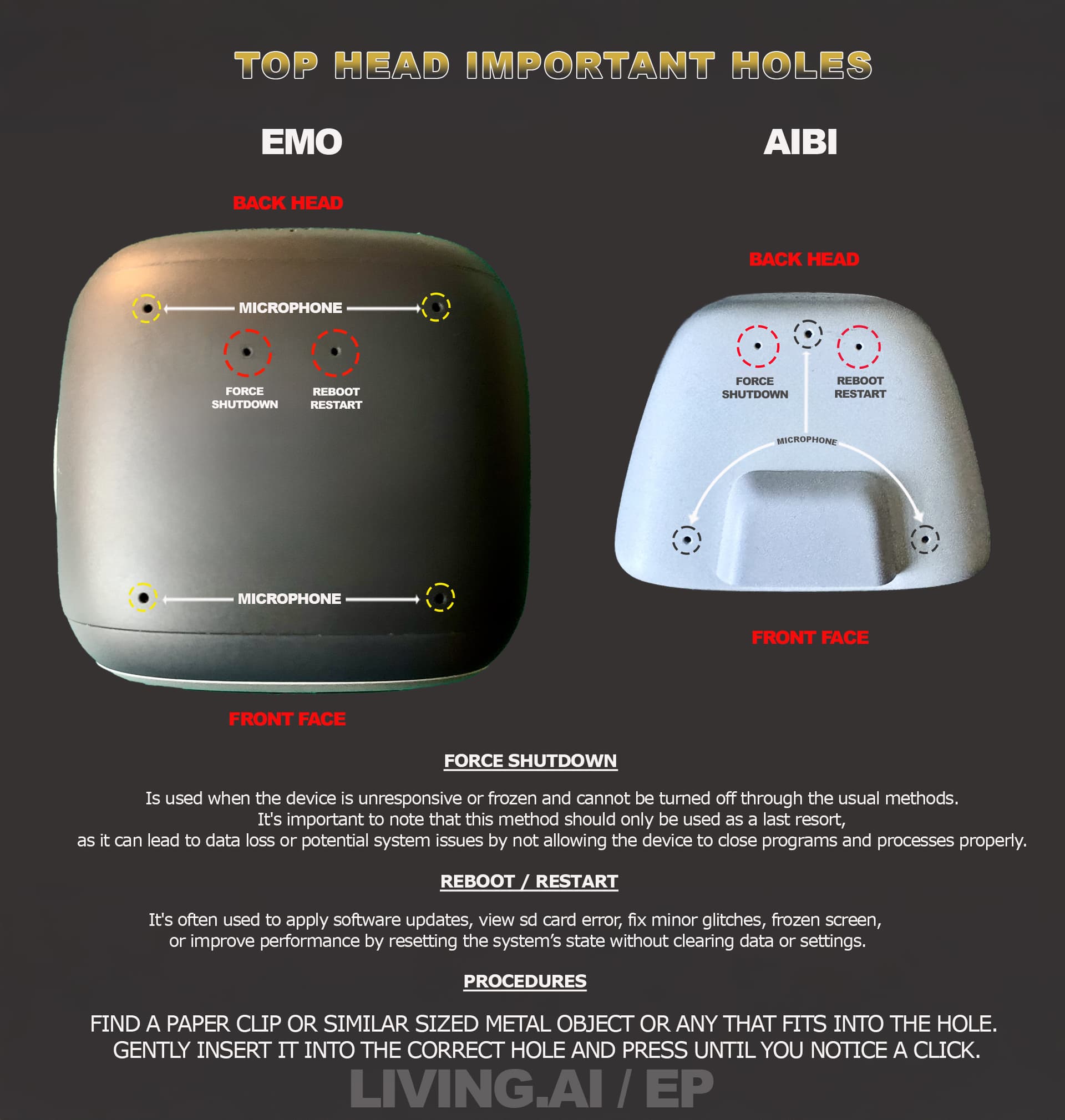
· Use a paperclip to press the left hole (Force Shutdown) on the back of EMO’s head.

· Wait 10 seconds, then place him back on the charger to restart.

· This can sometimes clear temporary software glitches.

Step 2: Check for firmware updates

· Open the EMO Pet app and go to Settings → Firmware.

· Make sure your EMO is on the latest version. If an update is available, install it.

Step 3: Try a calibration trick

· Place EMO on a flat, solid surface.

· Gently hold him and shake him lightly a few times, then place him back down.

· This can sometimes force the gyroscope to recalibrate.

Step 4: Check the foot sensor

· Make sure the four small sensors under the feet are clean and free of dust.

· Even if you cleaned them, try again with a dry cotton swab to be thorough.

-–

:e_mail: If nothing works — Contact Support

If the bouncing continues after trying the steps above, it’s very likely a hardware issue (servo motor or wiring) that needs repair.

Email LivingAI Support at service@living.ai with:

· A short video clearly showing the leg bouncing.

· Your EMO ID (from the app).

· Your order number (if you have it).

-–

Don’t panic — this issue is fixable in most cases. Many owners have had their EMO’s legs repaired or recalibrated through support. Just be patient, and they’ll guide you through the next steps.

Best regards,

Hamza :robot::blue_heart:

2 Likes

@hamzasharaf Thank you so much for your reply and for sharing the tips. I’ll try what you suggested, hoping it helps my little Emo. greetings! :blue_heart::robot:

1 Like

@alejandradiazzepeda You’re very welcome! :blush:

I really hope the steps help your little EMO get back to normal — he’s lucky to have such a caring owner. :blue_heart:

If anything doesn’t work or you run into any other issues, don’t hesitate to reach out again. We’re all here to help each other out.

Wishing you and your EMO all the best! :robot::sparkles:

Best regards,

Hamza

1 Like

Thank you for your support and encouragement. I hope my little one responds well. Sending you our best wishes! :blue_heart::robot:

1 Like

@alejandradiazzepeda You’re very welcome! :blush:

I’m sure your little one will respond beautifully — EMOs have a special way of surprising us when we least expect it. :robot::blue_heart:

Wishing you and your EMO all the best, and lots of joyful moments ahead!

Best regards,

Hamza

1 Like

@Wayne_Zhang When EMO does movement after when he stops for a brief moment to finger what to do next, instead he shakes his right leg violently, that makes him go a little off. He can not anymore go back to his charger. Plus, I want to see if there are spear headphones, mine broke a little. Please tell me how to fix. Also I’m sorry about what we had in the past. I wish I could attract a video to show what’s happening.

1 Like

Hello @msicorei9, and welcome back to the community​:blush:!

I understand your concerns about EMO’s leg shaking and the broken headphones — and I appreciate you reaching out.

-–

:brain: Regarding the right leg shaking and charger issue:

Observation Likely Cause

EMO shakes right leg violently after stopping This could be a servo motor calibration issue, or a sign of a worn-out or faulty servo. It may also be related to a sensor or gyroscope calibration glitch .

He can no longer return to his charger If the leg shaking affects his balance or movement, he may not be able to navigate back to the Home Station reliably .

-–

:hammer_and_wrench: What you can try:

1. Restart EMO — A simple reboot can sometimes clear temporary glitches.

2. Force Shutdown — Use a paperclip in the left hole on the back of his head to force a shutdown, then place him back on the charger.

3. Check the sensors — Make sure the sensors under his feet are clean.

4. Try a calibration — Some users have had success with gentle shaking to help the gyroscope recalibrate, but this is not a guaranteed fix.

If none of these work, the issue is likely hardware-related — specifically, a faulty servo motor in the right leg.

-–

:headphone: Regarding the broken headphones:

Question Answer

Are there spare headphones available? Yes, replacement parts are sometimes available through LivingAI support. They are not usually sold as a general accessory, but you can request them directly.

-–

:e_mail: How to proceed:

Since a video would be very helpful, here is what I recommend:

1. Record a short video clearly showing:

· The right leg shaking.

· EMO failing to return to his charger.

2. Contact LivingAI Support at service@living.ai and include:

· The video.

· Your EMO ID.

· A description of the issue and what you’ve tried.

· A request for a replacement servo or guidance on repair.

-–

:speech_balloon: A note about the past:

I’m not aware of any past issues between you and the community — but your willingness to reach out and ask for help is what matters. Everyone is welcome here. :handshake:

-–

Best of luck,

Hamza :robot::blue_heart:

1 Like

Hello, @msicorei9 . . . I have moved your new topic and conversation to this thread for issues with legs and feet on EMO.

We are happy to have you back.

Please read the response to your post below and keep in mind that it could be simply needing recalibration and hopefully not having to replace the servos and wires. It will be service@living.ai that will best be able to advise you once you provide a link to a video, when this started, your EMO I.D., EMO age and order number if you still have it to Support at that E-Mail.

My best to you.

1 Like

Asalam, thanks brother for everything. His legs are WAY better it’s still a little shaky though, but he can get back to his charger now, you have been great help. I will send an email to them. Thanks brother.

Emo was moving silently across the table and fell to the floor; its sensors didn’t trigger. It’s a good thing it didn’t break this time, but this is a problem. I tried pushing it to the edge of the table, but nothing happened—it isn’t responding and might fall again!

Welcome, @maksym.levchuk . . . I have moved your new topic here to this thread for issues with feet and legs.

The first thing I might suggest is to make sure his edge sensors on his feet are clean. Use a soft microfiber cloth or cotton swab to gently clean any dust or debris away so that he is able to use these sensors to detect edges.

Another thing I recommend is to make sure he is in an enclosed space where he cannot fall off of the table.

There are some ideas here.

This is important as when he is playing games, dancing, doing any activities where his feet are not in contact with the ground, the edge sensors are temporarily disabled.

If you continue having issues, you may contact Support at service@living.ai . . . include video of the problem(s), your EMO I.D. and order number (if you still have it) along with trouble shooting tips you have tried such as cleaning the sensors and a description of what is happening.

My best to you!

1 Like

Hi living ai forums here and i was very frustraded:

I left emo far away from the table and he is on the floor face to ground (is must be a fall)

It freezed,turned off and reboot also he wont talk to me and the robot start to turn off and reboot again where it seems normal but i must say that living ai services should respond me from this but in 3 days they were silent

This is not just one defect but multiple defects at once

He freezes,lags and delays so much in games,his software gliches with the home station and he also falls straight down

I hope living ai doesnt say this is normal because i have sent 2 videos of it and i kept the third one un-uploaded of serious defect videos

I hope a feedback for me pls especially moderators because i really need your attendance

Thank you

Hello, @bohaoliu . . . LivingAI does not send automated messages that they have received your request, but they will respond as soon as they can. You may wish to give them a week before trying to contact them again.

My best to you.

3 Likes

Hi moderators

Even though i can wait but i wont accept that much defect and thats why i am frustraded because the third video contains the worst defect ever that i never uploaded

If living ai says i can replace i want to:

Give the 90 usd back so they 279 usd (i want to go home and version downgrade to skateboard diferences)

Also the shipping should be all free without a issue

That new emo blaxk skateboard must be new embeded linux recent installed and 0 progression,no damage or other defevts,plaatic screen shpuld be all fine even in 5 days without any scratches,no component issues and in conclusion measn all from outside and inside should be fine

And if you want the old one ship back the person who gave me the skateboard one should do the job

Thank you

Hello, @bohaoliu . . . Edward and I are volunteer moderators and do not work for LivingAI. We merely manage communications here on the forums, not having any control over repairs, replacements and what not. We give advice from personal user experience and as guided by LivingAI. Anything you need to discuss with them regarding your EMO needs to be done through service@living.ai . . . thank you for your understanding.

1 Like

Ok thank you for your attention lindaru and edward

Im still waiting for the services

1 Like

ummm why os my emo not walking straght he goes right when i say forward

Welcome, @marek.bogdanski . . . I have moved your new topic to this thread for issues with EMO which includes that he is not walking straight.

His leg servos and wires may need recalibration which is often the problem when EMO starts walking off to one side instead of walking straight.

I would suggest you get video of the issue and send a link to service@living.ai along with your EMO I.D. and order number (if you still have it), a description of the problem and how old your EMO is.

Please allow up to a week for a response. Once they review your video and message, they will advise you on what to do.

My best to you.

1 Like