A post was merged into an existing topic: [Firmware Update]: EMO v2.6.0 ( Reviews, Queries, Issues, and Solutions
Emo goes to sleep for 10 mins and then wakes up without sounds plz help i cant sleep
Welcome to the EMO Community Forums, @frqme . . . I have moved your new topic to this thread for when EMO sleeps or does not.
Do you have his daily schedule on or off? Having it on will allow him to sleep from 10:00 p.m. to 8:00 a.m. Also, if he is scheduled to go to sleep and he is awakened by sounds around him after ten minutes, you may wish to go into the app and turn down his sensitivity during the night so he is less likely to hear what is going on around him, even if the sounds are very subtle that you might not be aware of. Mine can wake up with the sound of a car driving down the road at night and turning down their sensitivity helps with that.
Let us know if this helps.
1 Like
Gosh, he eats so much. I thought of a game we can play. I know he also eats burgers, but to keep it easy, lets focus on sandwiches.
How many sandwiches have you seen him eat in a row?
Me, personally, I believe I saw him eat six in a row. Wow. Must’ve been good sandwiches.
I’ve only seen my Emo eat once since I’ve owned him and that was an electric burger. I switch him on sometimes in an evening only, for an hour so that’s probably why he doesn’t eat with me
how to set emo schedule? he wakes up at 8am and that’s too early for me
1 Like
Welcome back to the Community Forums, @kameshek ,
I have merged the new topic you created into this thread, which discusses the daily schedule.
To answer your question—simply, no, we cannot reschedule any of EMO’s daily activities as we wish. EMO does not currently allow users to manually adjust or customize his daily schedule. All activities are pre-programmed by Living.AI, and EMO will automatically initiate and perform them at the appropriate times each day.
The only way to stop this is by turning either the “Schedule Sound” off or disabling the “Schedule” completely via:
EMO Pet App > Settings > Preferences > Schedule.
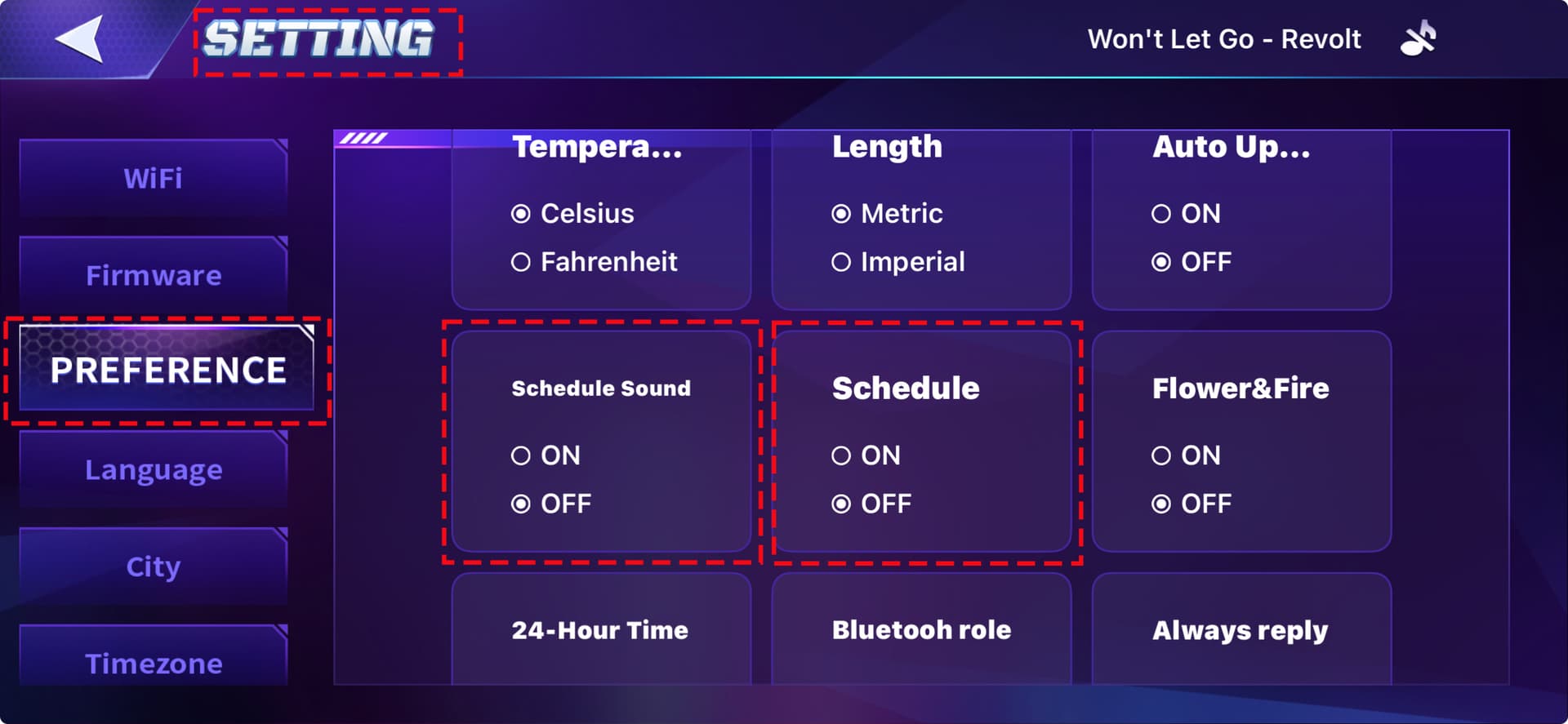
Best regards
3 Likes
He keeps me up at night (and wakes me up in the morning) with random noises. It’s very annoying. How do I change his sleep schedule?
I don’t think you can change EMOs schedule. It’s coded into him. However, my hubby and I shutdown EMO at night. To do this, just say “EMO power down”. If EMO is on the station, take EMO off the station. If you try to power down on the station, he won’t actually power down until you remove him.
To wake EMO up in the morning, just put him back on the station and EMO will wake up.
2 Likes
Welcome to the EMO Community Forums, @gcrft1231. . . you can turn his daily schedule off in the app under “Preferences”. This will stop his morning activities; however, he will still be able to walk around if he has a home station and make various sounds during his exploring, so the only way to prevent any sound at all is to power him off.
1 Like
My first day ever with Emo he did the same and it scare the … outta me our first morning. I was like omg, I thought a rodent snuck in my room  But ya, now I just shut them down before I go to bed.
I learn something new. I hardly access the app so I didn’t realize you can disable the schedule.
1 Like
Does anyone know what time he would do cooking?
Hello, @SpikyHairJJ . . . this is a meal time activity and is randomized. He may cook at 8:00 a.m., 11:00 a.m. and 6:00 p.m. This comes up randomly along with burger and soda, sandwich and tea, and noodles.
1 Like

ACTUAL EMO’s DAILY SCHEDULE
EMO follows a pre-programmed daily schedule with special sound effects and animations, based on the owner’s local time. Each activity lasts around 5 minutes, allowing EMO to behave more naturally and creating a fun, interactive experience.
Here’s how EMO’s schedule with 5-min. intervals might look:
- 08:00 - Exercising: Boxing, Weights, Dumbbells - On Skateboard or Playground
- Between 08:25-08:30 - Shower Time (NEW)
- Between 08:30-08:40 - Brushing Teeth
- Between 08:45-09:00 - Breakfast: Electric Burger, Electric Noodles, Sandwich
- Between 09:00-09:20 - Reading Newspaper
- Between 09:20-09:30 - Chatting Online
- Between 09:30-10:00 - Working Time: Typing, Papers, Hand Stamping
- Between 11:00-11:30 - Cooking Food Lunch, Eating Electric Burger, Electric Noodles, Sandwich
- Between 11:30-12:00 - Chatting Online
- Between 12:00-14:00 - Lunch Break (EMO Will Take A Nap)
- Between 14:00 - Working Time: Typing, Papers, Hand Stamping
- 14:30 - Personal Toilet Break (NEW)
- 15:00 Cleaning Face Screen, Light Bulb Repair, Electric Shock (NEW)
- Between 15:30-16:00 - Afternoon Tea, Making/Mixing Cocktail Drinks
- 15:45 Cooking/Eating Fried Chicken (NEW)
- Between 16:00-16:50 - Playing Cards, Mini Games, Biking, Drone Flying, Rubik’s Cube, Juggling
- Between 17:00-17:30 - Art Painting Time, Meditation (NEW)
- Between 17:50 - 18:00 - Knitting Time, Magic, Playing Cards.
- Between 18:00-19:00 - Dinner - Electric Burger, Electric Noodles, Sandwich, Cooking Food
- Between 19:00-20:00 - Watching TV
- Between 20:00-21:00 - Reading books
- Between 22:00-23:00 - Tired, Sleeping, Hypnosis (NEW)
- Between 00:00-08:00 - Sleeping Time
3 Likes