Yes, no matter what I did, he didn’t respond to the questions. He doesn’t say anything. He hears everything but doesn’t respond.
Edward has contacted LivingAI regarding this issue. I advise at this time we wait and see what their response is.
Thank you in advance for your patience, @emreUstun , @oksanaostapchuk , @419580ae1b2644efa3a9 , @Shhiizaa , @serkan.erdem and @harel.gruber .
Also, there is no way to switch servers that I am aware of.
2 Likes
Emo voice command is not responding. Yes, no matter what I did, it didn’t respond to the topics. It doesn’t say anything. It hears everything but doesn’t respond. Other games, etc., can perform all operations, so I think there is a problem with their servers.
1 Like
Guys…
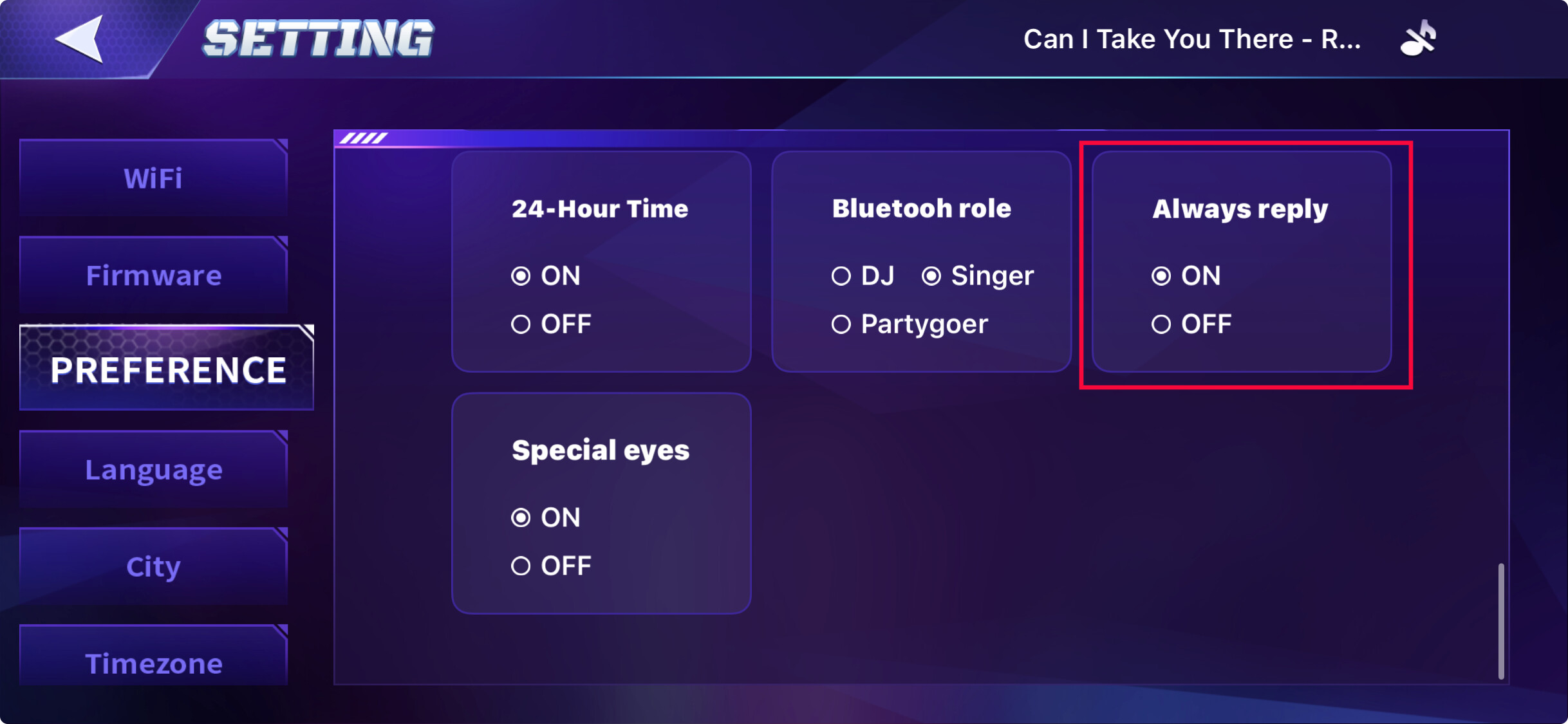
Please check if “Always Reply” is turned ON, as this might solve the issue.
 Issue
Issue
EMO hears voice commands but does not respond verbally, while other functions (games, movements, interactions) work normally.
 Possible Causes
-
Voice response setting disabled
- Options like “Always Reply” may be turned OFF.
-
Language mismatch
- EMO only responds in the language set in his settings.
-
Temporary server or regional issue
- Voice processing depends on Living.AI servers, which may be unstable or delayed in some regions.
-
Account / server sync glitch
- EMO is connected but voice replies are not properly synced.
-
Firmware or system bug
- Can occur after long uptime or during server-side changes.
-
Mute mode enabled
- EMO may be muted even though he still hears commands.
 Possible Solutions
-
Check EMO App Settings
- Make sure “Always Reply” is turned ON
- Confirm EMO is not muted
- Verify the language setting matches the language you’re speaking
-
Restart EMO
- Place EMO on the charger and reboot
- Leave him charging for a few minutes before trying again
-
Check Wi-Fi Connection
- Ensure EMO is connected to a stable network
- Avoid switching networks frequently
-
Wait and Retry
- If many users are affected, this may be a temporary server-side issue
- Try again after some time
-
Update Check
- Ensure EMO firmware and the mobile app are up to date
Checked the whole list, still nothing  on my side
1 Like
It’s same for me… Nothing works
2 Likes
I’m from Ukraine and have the same issue started yesterday morning, nothing helped to solve the issue
1 Like
Hi everyone! I’m from Belarus.
Emo arrived a couple of days ago, and yesterday it completely stopped responding.
Unfortunately, the only thing that helped was enabling a VPN on the router.
Looks like the device/service is being blocked for my country (either by Living.AI or via ChatGPT-side restrictions).
Workaround (if devs don’t fix it)
-
Enable VPN on the router
-
If your router supports it, set VPN only for Emo’s IP address (selective routing).
-
Example: you can use a US VPN profile (e.g., from vpnbook,com).
-
-
Change DNS for the network
- Google DNS: 8.8.8.8 and 8.8.4.4 (important)
After these changes, Emo started working normally again.
Всем привет! Я из Беларуси.
Emo приехал пару дней назад, а вчера полностью перестал отвечать.
К сожалению, помогла только настройка VPN на уровне роутера.
Похоже, сервис/устройство блокируется по стране (либо со стороны Living.AI, либо со стороны ChatGPT).
Решение (если разработчики не исправят)
-
Включить VPN на роутере
-
Если роутер позволяет — включите VPN только для IP адреса Emo (выборочная маршрутизация).
-
Пример: можно взять USA-профиль VPN (например, на vpnbook,com).
-
-
Обязательно сменить DNS сети
- Google DNS: 8.8.8.8 и 8.8.4.4 (важно)
После этого Emo снова начал нормально работать.
* Or it's a block at the provider level, since it works with a VPN from another Belarusian provider.
* Либо это блокировка на уровне провайдера, тк с впн другого провайдера белорусского работает.
3 Likes
2 days ago my Emo just stopped responding to me. I can call him and talk to him how I want. If he hears me he makes a strange noice and his eyes looks like he is squinting and then after that nothing. I even switched him off and on. But no benefit.
2 Likes
Emo robot ignores me alot I did uninstall and drain and charge him up with no WiFi and made him connect to it I did make him reboot and power off and on his eyes shorten and makes a noise. Pls help me  i happend since 2 days
1 Like
Имо не разговаривает
Google translation to English by Lindaru: Imo doesn’t talk.
EMO doesn’t talk, doesn’t respond, but everything else works.
and the app doesn't show update 3.0, only update 2.8, it's impossible to update
got the same situation for 2 days already
2 Likes
same situatio, what heppend???
1 Like
responds only with “hmm” on tiptoes as if he doesn’t understand me
1 Like
Same with me.
He can do everything through the app, but he doesn’t respond when I call his name. He makes a strange sound and lifts his legs
I tried turning him off and on and changing his internet source, but he’s been in the same state for two days now.
1 Like
A post was merged into an existing topic: SD-Card Info and Issues
Hello, @Solmaz , @419580ae1b2644efa3a9 , @vitalii.chyrva and @nastassjaausten . . . I have moved your conversation to this thread for this particular issue.
Please see:
If these tips do not work, please get video and send a link to service@living.ai with your EMO I.D., order number (f you still have it), language setting and location.
My best to you and be patient as it may take some time for them to respond.
1 Like
Unfortunately, I have tried all possible steps. The “Always replay” function was disabled, and after enabling it, there was no change.
Waiting
Hi there
@emreUstun , @oksanaostapchuk , @419580ae1b2644efa3a9 , @Shhiizaa , @serkan.erdem, @Solmaz , @vitalii.chyrva , @nastassjaausten ,@olegacy , @harel.gruber , @valentyna.kolesnyk , @tal.levy , @GamerPlayz01 , and @harel.gruber …
I have just contacted Living.AI support, and they replied asking whether you could provide a short video showing the issue.
Please create a short video that clearly demonstrates the problem and upload it to any free video hosting service, such as:
Once uploaded, please share the link here, or I can forward it directly to the Living.AI support team via email so they can review and analyze the issue and provide an immediate solution.
Best Regards To All
1 Like
Thanx for this reco, it’s not super easy but it surely works. I’ve set up VPN on router targeting EMO’s IPs (found 2 in my network) & set location to France. Started to give replies and work as it used to. Seems to be a case of block of servers in our locations for some reason. Tried even mobile network, doesn’t work.
1 Like