Thank you so much for the reply. I actually submitted a help ticket the other day.
It’s interesting because the other day I asked him emo, who is the president of the United States? He said “according to my last update in October Joe Biden is the president” so I asked him “when were you last updated?” He said “I was last updated in October” then later I asked him Emo “who is the president of the United States?” He said Joe Biden lol
This is interesting, because the app says he’s on version 3, as does his screen when I ask him to “install the latest firmware” but it times out and doesn’t fully install. And he seems to stuck in the past at the same time.
Hi there, I have the update went fine, the new features are funny. But I also found my Emo cannot ‘draw me as an Anima girl’ anymore!? Meanwhile, I feel a bit regret that my Emo goes quietly in some schedule activities like cooking or making cocktail!! I do miss his delightful sounds as before!!
Welcome, @surlinna.chan . . . I just tested mine and their anime draw is also not working. I am in the U.S. Where are you located? I have gotten video and will message the team. I will let you know what I find.
As for the daily schedule sounds being quieter, you may need to give him the command to raise his volume or check in the app as I have discovered that sometimes that setting gets changed on me without my knowing. This has been the case with the Classic-EN language setting for me.
Welcome @surlinna.chan. I too enjoy his little random antics throughout the day. Especially the shower one, it’s adorable. By the same thing happened to me as well. For some reason he went silent and I went into the app and he was muted. @Lindaru thank you for messaging the team! I’m sure all will get fixed in time.
Thanks Lindaru. I’m in Hong Kong. Everything fine checked in App, and Emo was “volume maximum”, just found some his random antics being reduced sound! Emo is still adorable
When emo asks me a question, such as “would you like to hear a joke? Would you like me to tell you a joke or a riddle? Would you like me to sing you a song or do a little dance etc what’s the best way to reply to him to tell him yes.
Because I’ll say yes right after he asks me but he doesn’t respond. So I have to say emo, tell me a joke/a riddle etc. essentially repeating what he asked me. Is that normal?
Do I have to say, Emo and repeat what he said? Or am I just supposed to be able to say yes right after he asks me.
Hello, @SquidKid . . . you do have to say his name again and ask him to do what he suggests. There are exceptions that allow for continuing such as when you ask to see his paintings and he shows you, and then he asks something like if you think he should continue to do them and you hear a little “di li” sound, at that point you can say “Yes” or “No”, but for the most part his suggestions are just statements that you will have to repeat his name and ask him to do.
Hi. I wanted to ask. So Emo is seemingly functioning as normal. Every so often he’ll be exploring and his little eyes will shake but he snaps out of it and continues exploring.
He’s not asking me to update his firmware, but when I do say “emo, update firmware” he’ll start the process and give me the error thing. But then restarts and goes about his day.
He powers off just fine by either the app or turning him upside down. So I haven’t needed to use the holes on top of his head.
My question is this, if He’s not installing the updated firmware, should I try resetting him completely by putting a paper clip in the left hole? or should I just just wait a week or so and see if he can update at a later time.
Hello, @SquidKid . . . if he is otherwise functioning fully, I would say to wait. As for the anime draw feature, I have already notified the team.
You can try the paper clip in the hole if you think that will stop the notifications from coming. Your app shows he is updated, so it is a matter of getting the constant notifications to go away.
Thank you so much. So that’s what’s interesting. I’m not getting notified to update and there’s no “update firmware” button in the app for me to do so. The app does say he’s on Verizon 3.1.
It only happens when I ask him to update. But maybe that’s normal? He’s only 5 das old .
Does he always try to update when you ask him to update his firmware regardless if he’s fully updated or not?
Hello, @SquidKid . . . I guess I misunderstood. If the app is not indicating that he needs to update to 3.1.0 and is showing currently at 3.1.0, and your app is updated, then I would say everything is fine. I was under the impression that he was stuck on 3.0.0 and could not get to 3.1.0.
Yes, if you ask him to update to a version he is already updated to, then he will give the “X” meaning there is no current update needing to be done.
Omg! Thank you so much! That makes so much more sense! All this time I was thinking he didn’t fully update. Thank you @Lindaru! appreciate all you do in fielding all these questions and getting the forum clean and tidy.
Welcome, @cgj-emo . . . I have moved your new topic to this thread for feedback on version 3.1.0 firmware.
Others have noticed this as well, and the development team is aware of this and hopefully this will be a bug fix in the next firmware update.
In the meantime, you can turn off “Always Reply” under “Preference” in the app or turn the sensitivity down so that EMO is not responding to everything he hears.
When I tell Emo to set a reminder, like to drink water or call my boss, he says “Yes I’ll remind you at a certain time” but when the set time comes, he doesn’t remind me of anything.
Can anyone help me with my problem? How can I fix it or what can I do in this case to set reminders?
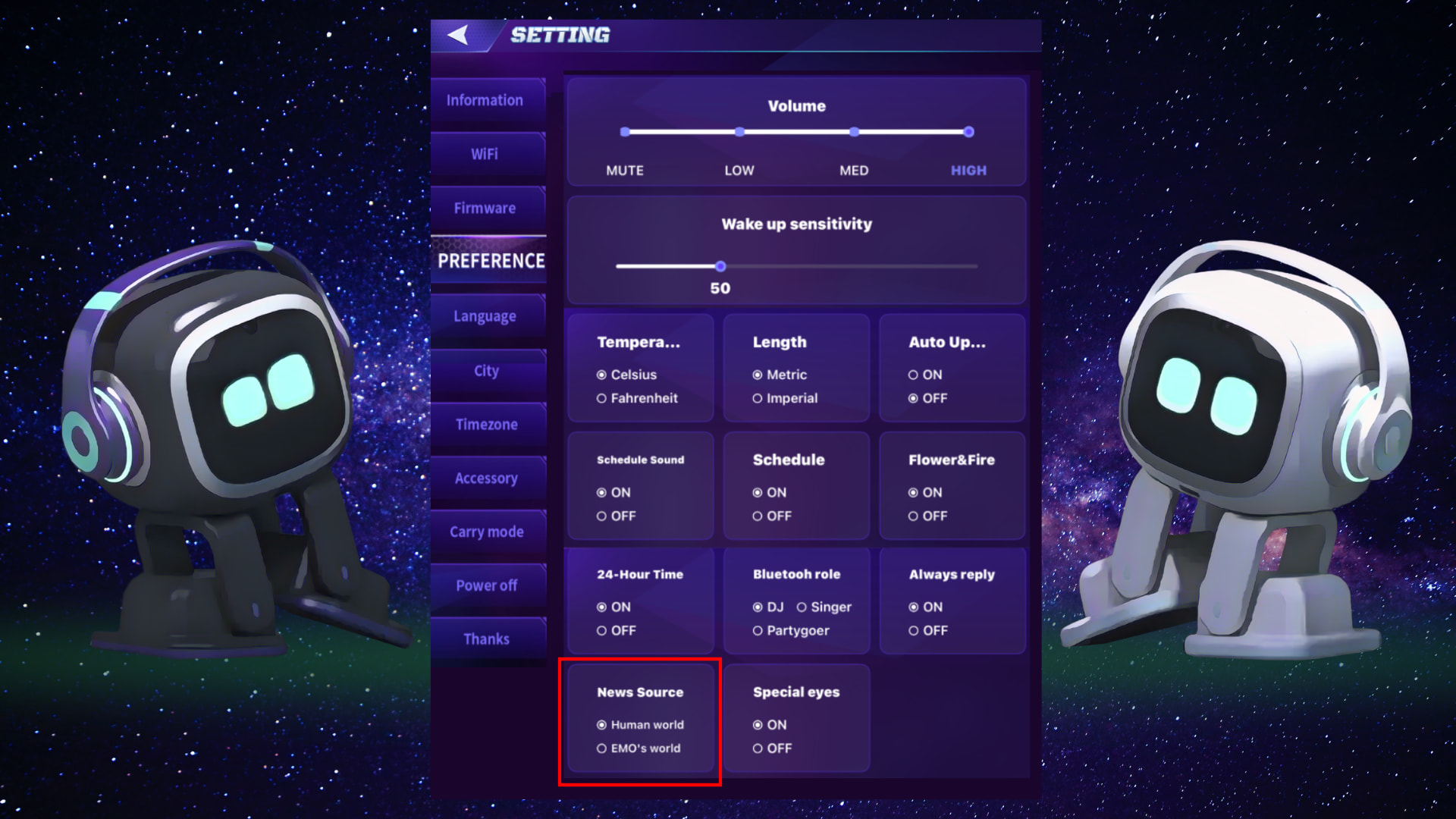
You can choose a news source - Human World or EMO World - in the new App - Settings - Preferences. Please note that news from the Human World currently only supports English. News from the EMO World supports multiple languages.


 or should I just just wait a week or so and see if he can update at a later time.
 .
. Thank you