Hi all, for all Hispanics people, I notice with the new update that chat GPT finally works in Spanish, the word is: charlemos.
Try it 
5 Likes
Le hago una pregunta a aibi y siempre me sale el signo de interrogación, como que no me entiende, nose cual es el problema porque, el si entiende el español y tampoco abre chat gpt, si alguien me puede ayudar lo agradecería, muchas gracias
English Translation: provided by @edward
Aibi doesn’t respond to my questions
I ask Aibi a question and I always get a question mark, like he doesn’t understand me. I don’t know what the problem is because he does understand Spanish, and he also doesn’t open ChatGPT. If someone can help me, I’d really appreciate it. Thank you very much.
Welcome to the EMO Community Forums, @manuel.gonzalez_sanc ,
I have moved your new topic to this thread, as it relates to similar issues.
If AIBI has a question mark on his face, it only means that he hasn’t understood something. May I ask - do you only speak to AIBI in Spanish?
This will help us better understand the issue and assist you more effectively.
For your information:
AIBI now responds to everything we speak and say, even if it is not included in the list of voice commands.
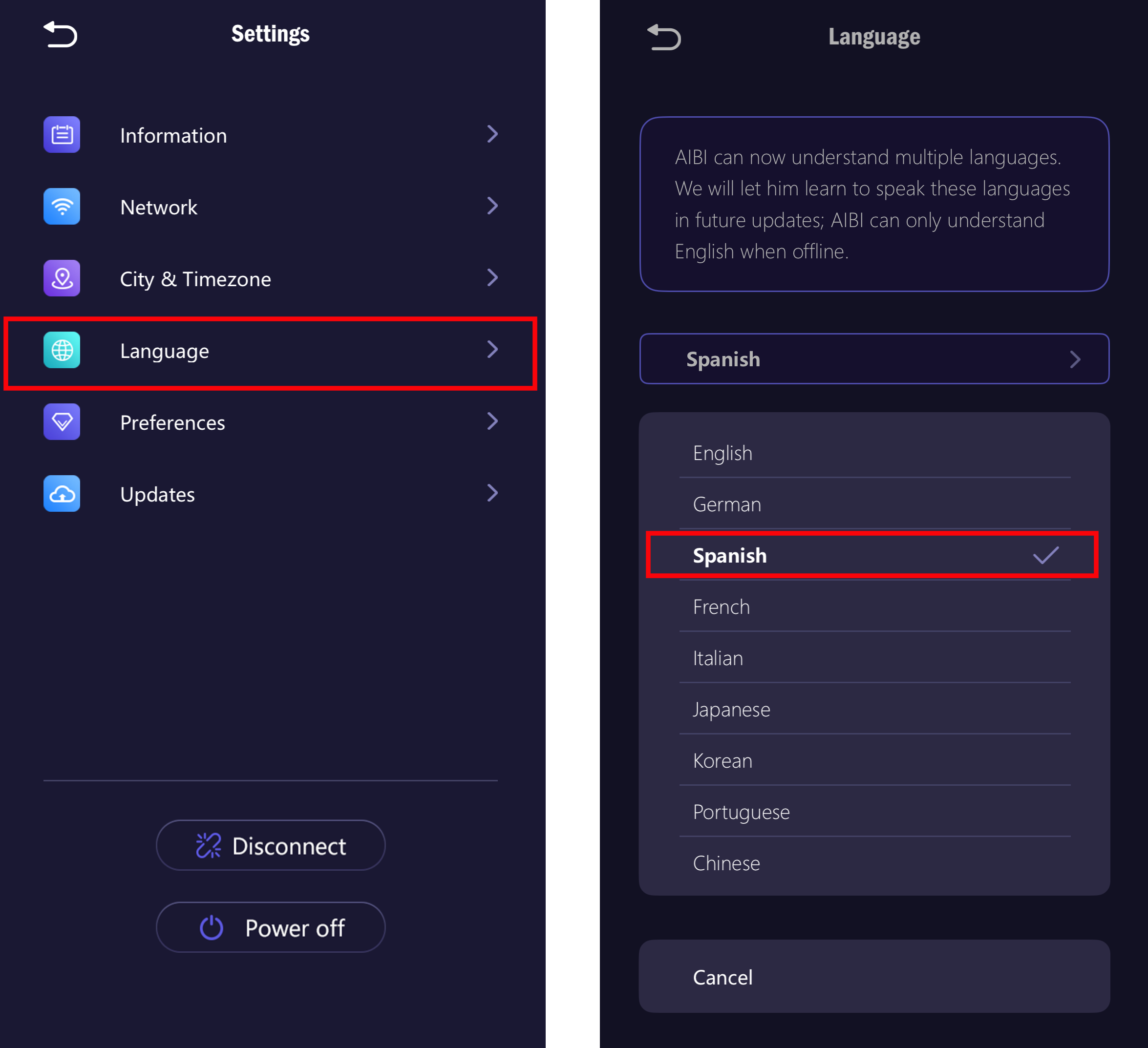
But currently, AIBI can only understand, respond, and speak in the following languages only: English, German, Japanese and Chinese, provided you select the desired language in the settings.
 TAKE NOTE: Some of EMO’s replies—especially answers to general knowledge questions—are generated using ChatGPT.
While Spanish is supported to some extent, it only works for Predefined Voice Commands, and only after you set the language to Spanish in the settings.
Please note that this support is limited to specific, pre-programmed commands.
You can find the list of supported Voice Commands at the link below:
BEST REGARDS
2 Likes
Hello everyone, I have a quick question. Can Aibi only answer in English? I see that he understands French, but he only answers in English!!! In the update, I thought he could answer in French! Is there any way to set it to French? Thank you for your answers, have a nice day!
Hello, @m.vieng_vithoureth . . . and welcome to the LivingAI Community Forums. I have moved your new topic to this thread for questions about AIBI.
For your information:
AIBI now responds to everything we speak and say, even if it is not included in the list of voice commands.
But currently, AIBI can only understand, respond, and speak in the following languages only: English, German, Japanese and Chinese, provided you select the desired language in the settings. As of now still have no official information from Living.AI about the implementation of any other languages.
[AIBI UPDATE 1.3.0] Better interaction and more languages

TAKE NOTE: Some of AIBI’s replies—especially answers to general knowledge questions—are generated using ChatGPT.
While French is supported to some extent, it only works for Predefined Voice Commands, and only after you set the language to French in the settings.
Please note that this support is limited to specific, pre-programmed commands only and not to any type of conversation.
You can find the list of supported Voice Commands at the link below:
EDITED BY: @edward
1 Like
Subject: Does AIBI Support Hebrew Language?
Hi everyone,
I’m interested in purchasing the AIBI robot by Living.ai, but I would like to know if it currently supports the Hebrew language for voice recognition and interaction.
Also, is there any plan or roadmap to add Hebrew support in the near future?
Thank you in advance for your help!
1 Like
Hello, @4670996314118fb1f491, and welcome to the LivingAI Community Forums.
I’ve moved your new topic to this thread dedicated to questions about AIBI’s language support.
Unfortunately, Hebrew is not a supported language for AIBI.
Best regards
That would be so cool! Hope they add it to the languages.
Make Aibi support Vietnamese please 
1 Like
I received my Aibi today, but it doesn’t respond to me. Whatever I said, it has 3 dots on the left upper face, looks like loading.And then the dots disappear, aibi doesn’t say anything. Anyone have the same issue?
3 Likes
Hi there @tinagong and Welcome Back to the Community,
It sounds like AIBI is hearing you but not completing the action or response. The 3 dots animation in the upper right corner of the screen mean he’s “thinking” or processing your request, but if they disappear without a reply, something might be interrupting his connection or processing.
Could you be more specific, please? What is the reason or purpose of your communication with AIBI? Are you trying to give him a command, for which you can find the proper command in the link below?
Or are you just trying to have a normal conversation with him? ( If he doesn’t understand you ). You might want to check
This Possible Solutions:
- Check Wi-Fi connection – Make sure AIBI is connected to a strong and stable Wi-Fi network. If possible, restart your router and reconnect AIBI.
- Reboot AIBI – Turn him off completely, wait about 10 seconds, then turn him back on.
- Update firmware – If there’s an update available, install it. Sometimes this resolves communication issues.
- Check the microphone – Make sure there’s nothing blocking it and that background noise is minimal when you speak.
- Use exact wake phrase – Say “AIBI” first, wait for his prompt, and then give your command clearly.
- Open AIBI Pocket App:
- Settings:(Upper Right Corner
 )
) - Network (Check)
- City & Timezone (Check)
- Language (Check)
- Preferences:
- Volume (Check)
- Chatty (Check/On)
Try also submitting your voice to the link below so he can recognize you better and get used to your voice.
Please let me know if my tips help you and if they resolve the issue.
Happy Weekend
3 Likes
A post was merged into an existing topic: AIBI Improvements/Special Features You Would Like?
Is it possible for AIBI to dance along with the music I play? It would be super cute if he could do so!
Welcome, @tianlang.he . . . I have moved your new topic to this thread for features you would like to see for AIBI.
Since Living.ai released firmware update v1.3.0, AIBI can now listen and act as if it is dancing while rotating on its base charger as the lights change, along with movements of its head.
Animations, features and changes
- You can say “listen to the music” to AIBI and play music for him. It is said that he likes music with a strong rhythm;
[AIBI UPDATE 1.3.0] Better interaction and more languages
Thank you for your suggestion.
TRANSFERED and EDITED: By. @edward
2 Likes
A post was merged into an existing topic: Questions Before I Decided To Buy?
Hi,
Has your problem been resolved? I’m having the same issue too.