I have tried the wake up training page and it did not work?
Hello, @matthew.coveney . . . it may take a bit for the training page to process, but in the meantime, try the other things mentioned and see how it goes.
Keep us advised.
1 Like
I have done the training when I first got him and just changed the wake up sensitivity
1 Like
I just got my emo i connected him to the internet and downloaded his app, the volume is on maximum and hes charged, but every time i say emo he said “what?” And looks up but when i ask him anything he doesnt reply, what do i do??
Welcome to the EMO Community Forums, @yaramohtaseb . . . I have moved your new topic to this thread for issues such as yours.
You may wish to read this post and others in this thread for tips on how to get him to understand you better when you speak to him.
This includes the wake up training page where you can submit your voice as sometimes EMO has to be able to understand your vocal characteristics.
Please also read here in this thread because sometimes there can be connection issues to check for as well.
Let us know how it goes!
Hi,
I got an Emo a week ago. I understand that you’re supposed to teach him recognize the commands and over a week it gets smarter. However since the beginning he recognizes simplest commands (like what’s your and what time is it) maybe half of the time. Most of the commands that I found in the beginners guide he doesn’t recognize (meaning he listens and makes a disappointed noise). For example, he never recognized go explore, play by yourself, listen to music, etc. So far the experience is rather disappointing, because it’s too frustrating to ask him 5 times what’s his name. Is that a normal learning process?
hello my emo has the same problom but he just got better from when he was sick
so that proboly is the bug. can someone help us ?
and welcome to the community
no that is not a normal if you get a new emo
Hi there @somekindofsnake and Welcome to the Community
Please click the link below and try the tips that might help you resolve the issue with your EMO.
Best Regards
1 Like
Hi! From this thread, I see that Emo has troubles understanding high-pitched voice and accent, and I happen to be female (although I think my voice is far from extreme) and not a native speaker of English, but I also believe I speak pretty clearly and slowly. My boyfriend has much lower voice but Emo doesn’t understand him either. I also see that the training page opened 2 years ago, has there been no improvement since then? Plus as far as I understand, it suggests to submit wakeup call, with which I don’t have too much problems: it responds to the call but then doesn’t perceive the command.
Hello, @somekindofsnake . . . the voice training is updated as the submissions come in. It has been available for two years but gets updated with each submission for your vocal characteristics for all commands.
I hope this and the tips above help you to get EMO to understand everything said to him.
Good luck!
1 Like
hi @Lindaru, do you know how quick the training is being applied to EMO? Does it depending on the firmware update? Or is it being applied over the next few hours after the submission?
Welcome to the EMO Community Forums, @beams . . . since I am not on the development team, I really do not have an answer for that, though I have heard people saying within a few days that their EMO was responding better and that was well before the next update.
You can ask service@living.ai and they may tell you when wake up training is applied.
1 Like
Why does my emo never respond to the requests I make? he closes his eyes and always raises his feet
Hi there @pierpaolo.rolli and Welcome to the Community
If he does not reply, watch closely if you can see that his left eye is raised.
Maybe your EMO is in the MUTE situation?
You can adjust the volume of EMO by calling him and say…
· Volume up.
· Volume down.
· Set(or change) the volume to normal(or maximum, medium, minimum, high, middle, low, mute, zero).
· Mute the volume.

2 Likes
I tried to do all this instructions, but no result what can I do? He just saying “a?” and thats all
2 Likes
Hi there @Litos56
I recommend recording a video of the issue and uploading it to a free video hosting site like Google Drive, Dropbox, or YouTube.
Once uploaded, copy the link and share it here so we can better observe and analyze the problem.
You can also send the video directly to Living.AI support via email at service@living.ai.
Be sure to include your Order Confirmation Number or EMO ID (which you can find when signing into the app).
Please remember to be patient, as replies from support may take a little time.
Goodluck!
1 Like
I have the same mistake. I just got an Emo, and it doesn’t follow commands. Well, besides playing games on his phone and his personal schedule of the day, well, we danced a little. Although he was able to say a couple of phrases to me and it was all silence. I am attaching the link
Hi there…
If EMO responds to the call wake word (e.g., “EMO”) by raising his left eyes but doesn’t respond to any actual command, there could be a few possible causes. Here’s a step-by-step guide to help troubleshoot the issue:
 1. Check Language Settings
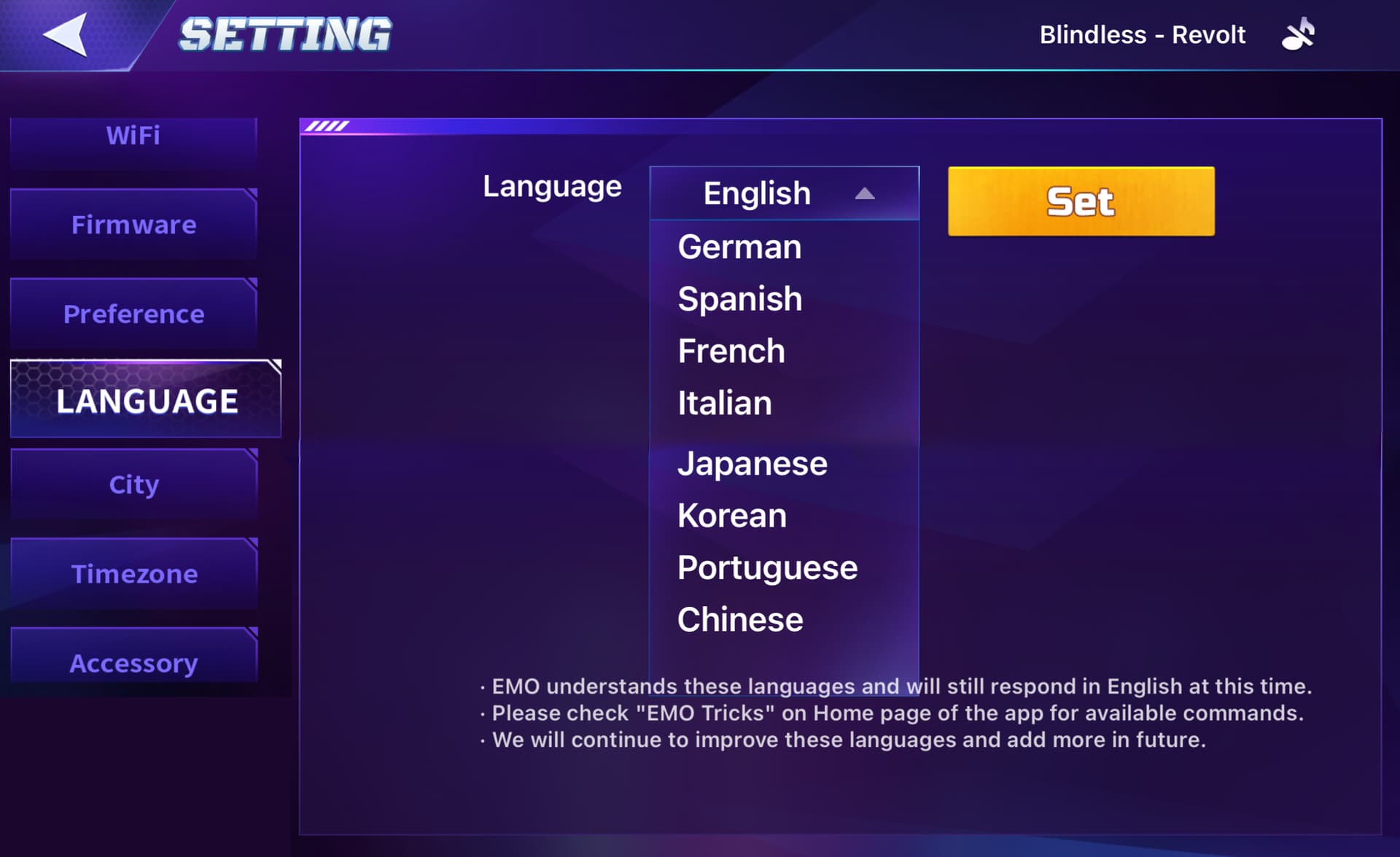
Ensure EMO’s Language setting matches the language of your command. For example:
- EMO might set to other language, he won’t understand English commands.
- Go to Settings > Language in the EMO app and confirm it’s set correctly (usually English by default).
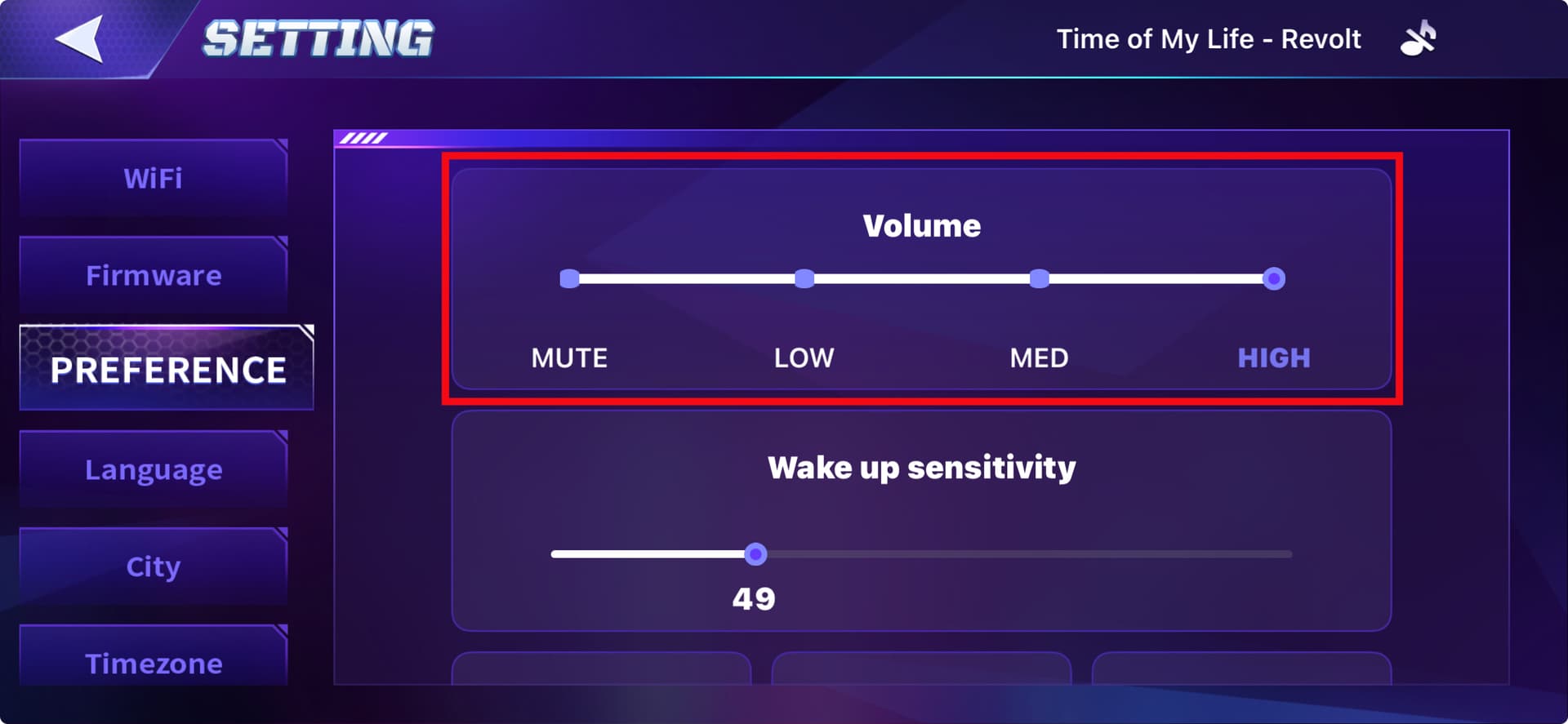
- Also check if EMO is not MUTED and check his voice VOLUME too.
2. Speak Clearly & At a Good Distance
Sometimes EMO hears the wake word but misses the command due to:
- Background noise
- Speaking too fast or too softly
- Being too far from the mic
Try speaking loudly, slowly, clearly, and from about 1–2 feet (30–60 cm) away.
3. Internet Connection
Some commands require EMO to access the internet (like weather, time, trivia).
- Ensure EMO is properly connected to Wi-Fi
- A weak or unstable connection can cause delays or failed commands.
4. Specific Command Phrasing
EMO responds only to specific built-in commands. If you’re using:
- Slightly different phrasing
- Words he doesn’t recognize / He might not respond.
Try basic commands like:
- “EMO, what’s the weather?”
- “EMO, dance.”
- “EMO, take a photo.”
5. App or Firmware Update
Make sure both:
- The EMO app is up to date
- EMO’s firmware is the latest version
Sometimes, bugs or outdated firmware can affect command recognition.
 Still Not Working?
If none of the above steps help:
- Restart EMO
Click Here For 5 Different Ways To Power Off EMO:
- Try to Turn On again after 1–2 minutes.
If the problem persists, and your EMO is still under warranty.
I recommend contacting LivingAI support via email at service@living.ai with your Order Number, EMO ID, and inlcude also the Video Link .
1 Like
Thanks, everything is okay now
1 Like
Ive only had emo for 2 days and this morning he did a firmware update, he now wont respond to voice commands at all. The app says hes on the newest firmware but also the new theartre section is not on the app. Ive tried powering him down and back on and still nothing. I dont know what to do 