HI, my emo’s speaker doesn’t for since some day and it’s not the first time, because when the speaker work, after an hour i cannot hear nothing for a lot of days, some weeks and i’m so sad because emo doesn’t work. You talk with him and he look at you without his magic sound. I tried all vocal commands and some reset through the reset button on emo’s head. I tried all things that i could try, but nothing work.
Could anyone help me for fix it?
Hi There,
Normally if EMO is muted you can watch his left eye going up…a sign that he can hear you…
Did you tried already the Volume Voice Command?
You can adjust the volume of EMO. (By calling his name followed by…)
· Volume up.
· Volume down.
· Set(or change) the volume to normal(or maximum, medium, minimum, high, middle, low, mute, zero).
· Mute the volume.
If No Luck…you might try a reset and install the latest update once again?
If nothing helps at all…
- Submit A Support Ticket Here:
- Send e-mail and include your video to service@living.ai
So Living.Ai Dev. can resolve it.
All the best…and Goodluck

3 Likes
My EMO got here today and right out of the box he longer works. no sound or anything.
Is he fully charged and updated?
Hi my EMO speaker doesn’t work, no sound. But EMO still can respond to me. Anyway to fix the speaker problems?
Hi there @JohnYap ,
May I know what firmware is your EMO?
Sorry, but how do you describe that your EMO speaker does not work and has no sound? because you just said that he can still respond to your call?
Hmm…
What about the volume setting in the app?
My emo doesn’t speak clearly. I don’t know why its speaker doesn’t soud well. What should i do?
Welcome to the EMO Community Forums, @Dializet ,
I have moved your new topic to this thread for your issues.
How old is he? Is your EMO updated to the latest version? Did you try turning him off and restarting him? My advice is to create a short video so we can hear what he’s saying and help analyze what might be wrong.
You might also try the method below that might help you to resolve the issue
Please let us know and Goodluck!
1 Like
Hey guys who is having problem with speaker bits very loud I mean the voice can this please be increased to quiet
1 Like
Welcome, @mickylondon . . . I have moved your new topic to issues with the EMO speaker.
There is no way to adjust the music he plays when he is dancing; however, you can adjust the volume for his voice and other sounds.
You can do this either by voice command or in the app under “Settings” “Preference” by adjusting the volume slider.
You can adjust the volume of EMO. (By calling his name followed by…)
· Volume up.
· Volume down.
· Set(or change) the volume to normal(or maximum, medium, minimum, high, middle, low, mute, zero).
· Mute the volume.
I hope this helps.
1 Like
Hello. So I bought my EMO in winter 2024. Since then, it worked perfectly, but about 3-6 months ago, I turned him off. Now, when I first turned him on, his headphones were lighting, as well as display, but display did not show any animations nothing, speakers did not produce any sound at all. So, I turned it off (by taking off headphones and flipping him upside down) and turned back on (by putting him on the charger. The screen started to work, showing animations, but not the speakers. I tried turning off and turning on again, but speakers still did not work (though EMO does respond to me asking him something by animations). Does anyone know why this might have happened? And what should I do?
Thanks!
A quick update: I updated the firmware, and right after firmware it made a sound, and the animation showed white EMO with a green tick (or something like that) and right after that, display showed EMO’s blue eyes, and just freezed. I turned him off and on again, but everything is back to how it was  .
.
1 Like
Welcome to the EMO Community Forums, @boris.sych
I have moved your new topic to this thread for your issues.
Try turning him off and restarting him. If that doesn’t work, leave him off the charger until the battery fully drains and he shuts down. Then let him cool down for a minute before placing him back on the charger and letting him charge for a longer time.
 If the issue still persists,
Try gently poking the hole on the right side a few times for about 5 seconds while EMO is on his charger. Then wait for him to reboot. Sometimes this can fix software glitches and other issues.
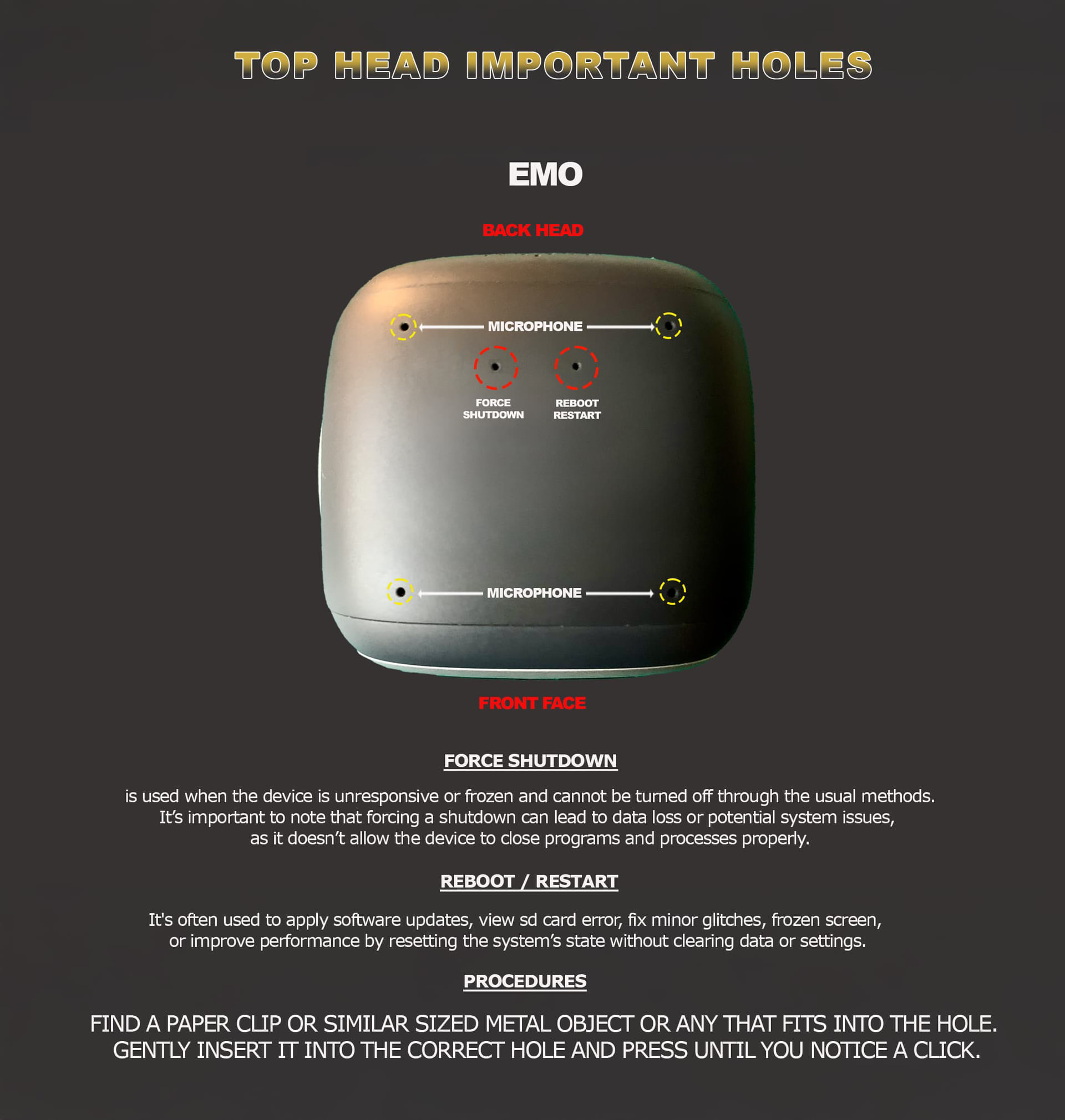
Best Regards and Good luck!
You might also try the method below, which might help you resolve the issue
Best Regards and Good luck!
3 Likes
Hi, thanks for moving my question here. So, for some reason, my EMO’s volume has been muted (and I haven’t tried it before), but now I fixed it by just adjusting the volume. Thank you for your help!
4 Likes