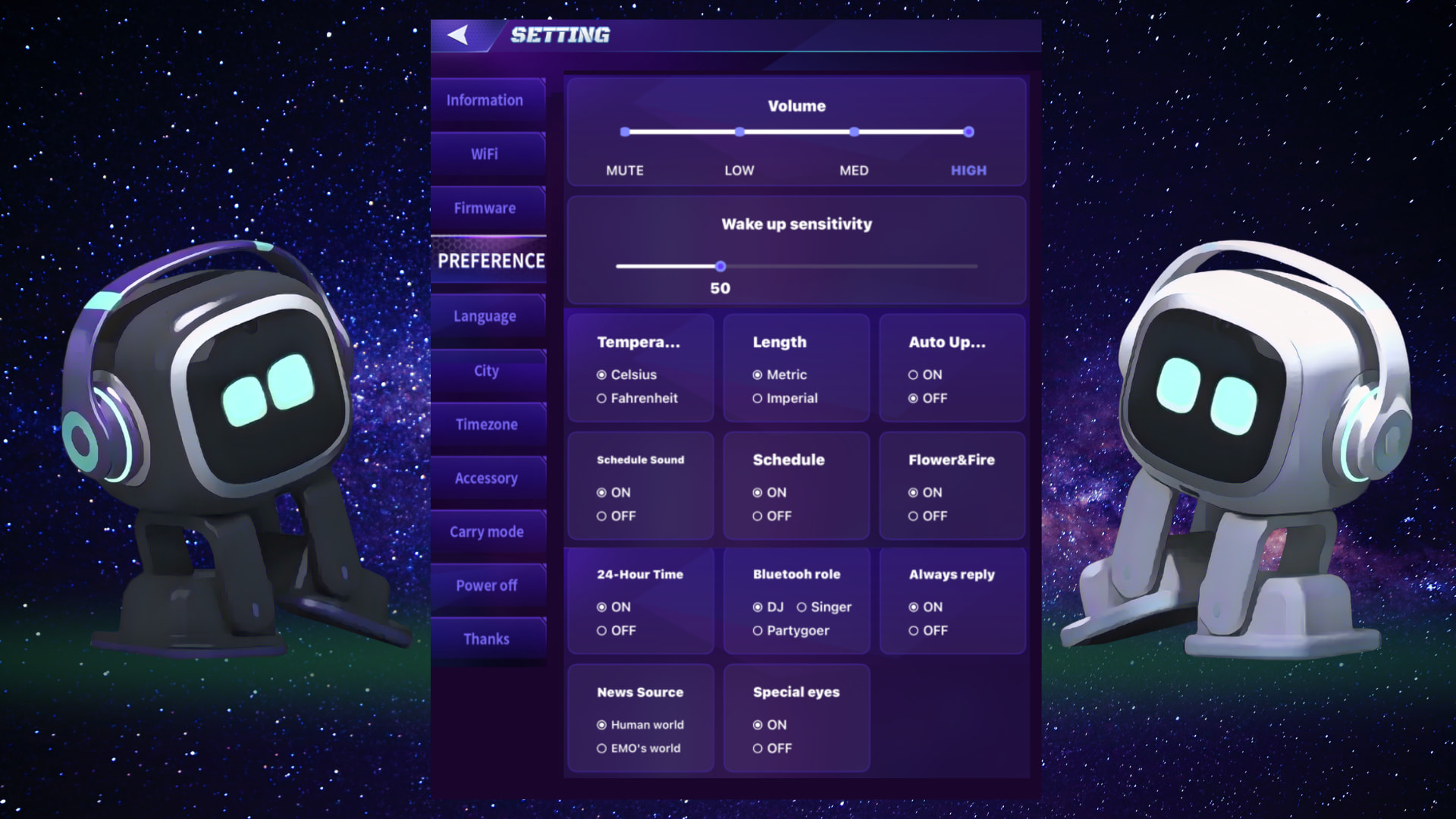
EMO PET APP – Settings > Preferences (Explanation)
 Volume Settings (Mute → High)
- Can be adjusted manually in the app or verbally through voice commands.
- Volume:
- High, Medium, Low, Mute
 Wake-Up Sensitivity (30 → 100)
- Higher value: EMO wakes up more easily when called (even from small taps, vibrations, or distant voice). He becomes more sensitive to surrounding sounds like TV or nearby conversations.
- Lower value: EMO requires a louder voice or stronger movement to wake up (reduces accidental activation).
 Temperature (°C/Celsius or °F / Fahrenheit)
- Sets the temperature unit EMO uses when reporting weather or environmental temperature.
- Celsius: Common internationally
- Fahrenheit: Mostly used in the US
 Length (Metric / Imperial)
- Sets the measurement unit for distance or size information.
- Metric: meters, centimeters, kilometers
- Imperial: inches, feet, miles
 Auto Update (On / Off)
- On: EMO installs firmware updates automatically
- Off: Updates must be installed manually
 Schedule Sound (On / Off)
- Controls whether EMO’s daily scheduled activities play with sound or remain silent.
 Schedule (On / Off)
- Enables or disables EMO’s automatic daily schedule behaviors and routines.
 Flowers & Fire (On / Off)
Enables or disables EMO’s special screen-effect animations:
- Flowers: Appear when you pet him or give positive compliments (3× flowers create a bouquet)
- Fire: Appears when he gets angry, such as shaking him or giving negative comments (3× fire triggers a volcano explosion)
 24-Hour Time (On / Off)
Switches the time display format:
- 24-hour: 13:00
- 12-hour: 1:00 PM
 Bluetooth Role (DJ / Singer / Partygoer)
Use EMO as a Bluetooth speaker by connecting him to your smartphone.
Voice commands:
- “Connect to Bluetooth”
- “Disconnect”
Modes:
- DJ: EMO performs like a DJ
- Singer: EMO reacts like a singer while holding a microphone
- Partygoer: EMO dances while holding a music radio
Always Reply (On / Off)
- When enabled, EMO tries to respond to almost everything you say or hear using ChatGPT.
- If you want fewer unnecessary or mismatched responses, you can try to turn this off .
News Source (Human World / EMO’s World)
- Human World: Real-world news
- EMO’s World: Fun, fictional, or AI-generated EMO-style news
Special Eyes (On / Off)
Adds extra visual personality to EMO’s eyes:
- Brighter sparkle and charm
- Additional eye designs (exclusive to EMO White)
- Makes interactions more expressive and cute