Welcome to the Community…
- What is the latest update installed?
- Did EMO fall recently?
- How old is your EMO?
Most cases of “black screen EMO” are just deep battery drain, and charging for a while fixes it.
If your EMO Robot suddenly shows a black screen and no headphone lights, it usually means the robot has no power, is frozen, or has a hardware connection issue. Here are the most common causes and what you can try.
 Causes and Possible Solutions
 Battery Completely Drained
Cause:
If EMO’s battery drains to 0%, it can appear totally dead (black screen, no lights).
Solution:
- Place EMO on the charger (skateboard).
- Make sure the charger is powered.
- Leave it charging 30–60 minutes.
- Try saying “EMO wake up.”
Sometimes it takes a few minutes before the screen turns on.
 Charging Dock Not Supplying Power
Cause:
The charging skateboard may not be getting power.
Check:
- USB cable connected properly
- Adapter working
Solution:
- Try another USB cable or adapter.
- Plug into a different power outlet.
 EMO Is Frozen (System Crash)
Like a tiny computer, EMO can sometimes freeze.
Possible Solution: Force Shutdown or Reboot/Restart
-
Force Shutdown EMO
-
Wait 10–30 seconds.
-
Place EMO into Charger
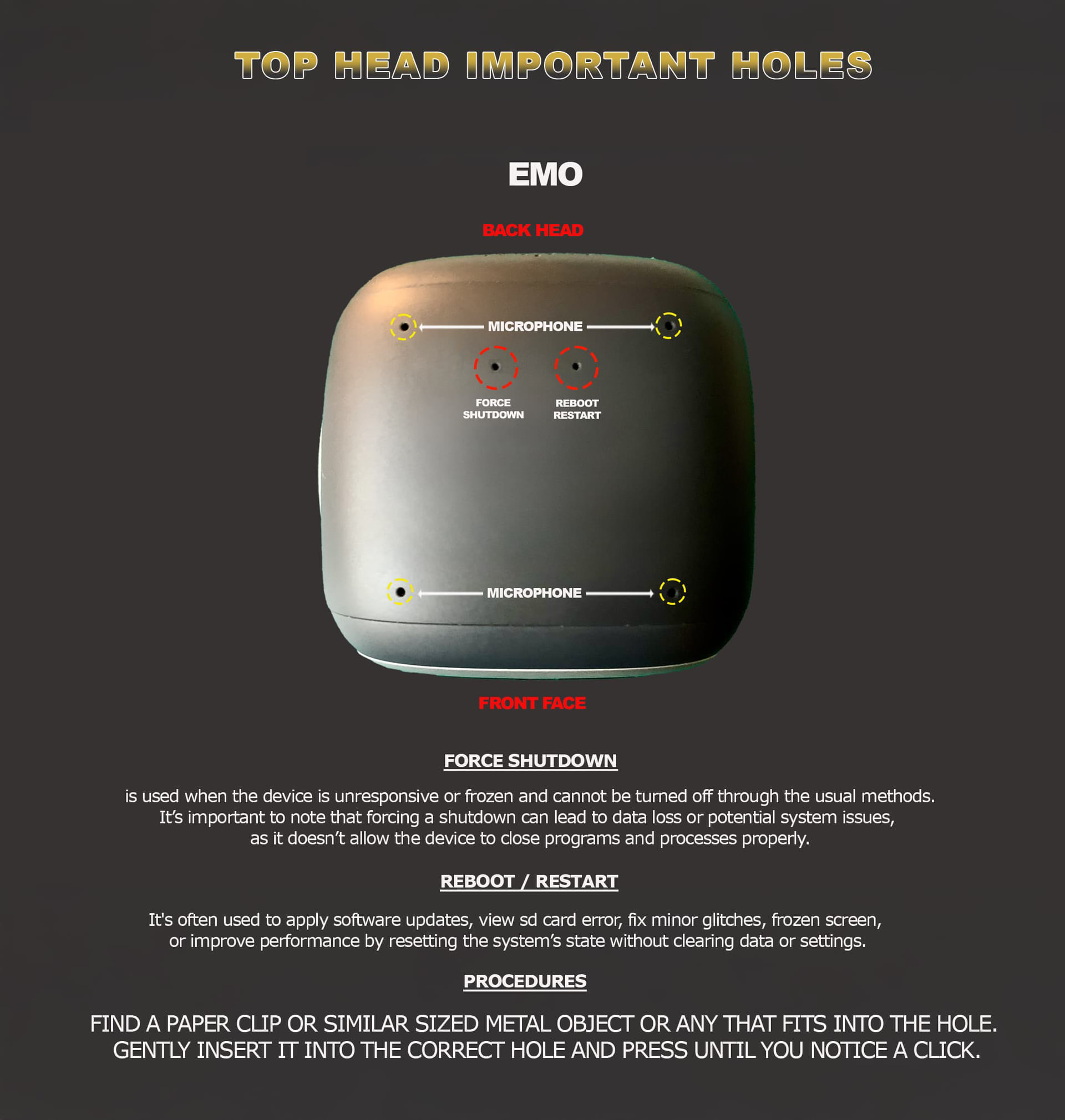
If he doesn’t reboot
 Charging Contacts Might Dirty
Solution:
Clean EMO’s feet with a brush
Clean the charger plate, which may be dirty.
 Internal Battery Protection Triggered
If the battery voltage drops too low, protection circuits can shut everything off.
Solution:
- Leave EMO on the charger for several hours.
- Sometimes it takes 1–2 hours before it wakes up.
 Loose Internal Battery Connector (Rare)
If EMO is dropped or bumped, the battery cable inside may loosen.
Symptoms:
- Completely dead
- No lights
- No charging response
Solution:
This requires opening EMO, which may void warranty. Contact **Living.AI support first.
If nothing at all happens, it is likely:
- battery issue
- charging dock problem
If none of the tips helped at all, I would advise you to record a video of the situation and send the link along with your EMO ID, order number (if you still have it), a description of the problem, and details about what charger you were using.
Send all of this to: service@living.ai
Good luck, and I wish your EMO all the best.