Hi there @Vixiak and Welcome to the community,
Sorry about your EMO.
Is your EMO updated already to the latest firmware v.3.1.0 ?
Most likely causes
1)  Battery wear / failure (very common)
Lithium batteries inside EMO typically degrade after many charge cycles or long storage.
Signs that match your case
- Turns on only while on the base
- Battery % never increases
- Shuts off instantly when picked up
- Charging icon may appear, but never fills
 This is the #1 cause in most reports.
2)  Charging contact problem
Even if cleaned, the charging pads might:
- be worn
- slightly recessed
- oxidized internally
- not pressing firmly enough
So EMO gets just enough power to run, but not a stable current to charge.
3)  Charging circuit damage (inside EMO)
Power-management chip failure can happen after:
- power surge
- wrong adapter voltage
- long overheating while docked
The robot works as a “direct-powered device,” but the battery never charges.
4)  Firmware battery calibration bug (rare but possible)
Sometimes EMO thinks the battery is 0% even when it isn’t.
What you can still try (before support)
Step 1 — Hard reset battery calibration
- Remove EMO from the base
- Let him completely die (don’t place back)
- Wait 30–60 minutes
- Place on HOME base and DO NOT touch for 8 hours straight
(This fixes mis-read batteries sometimes.)
Step 2 — Check adapter specs
Use only:
- 5V 2A USB power (not fast charger / PD / QC)
Fast chargers often power the robot but don’t charge the battery properly.
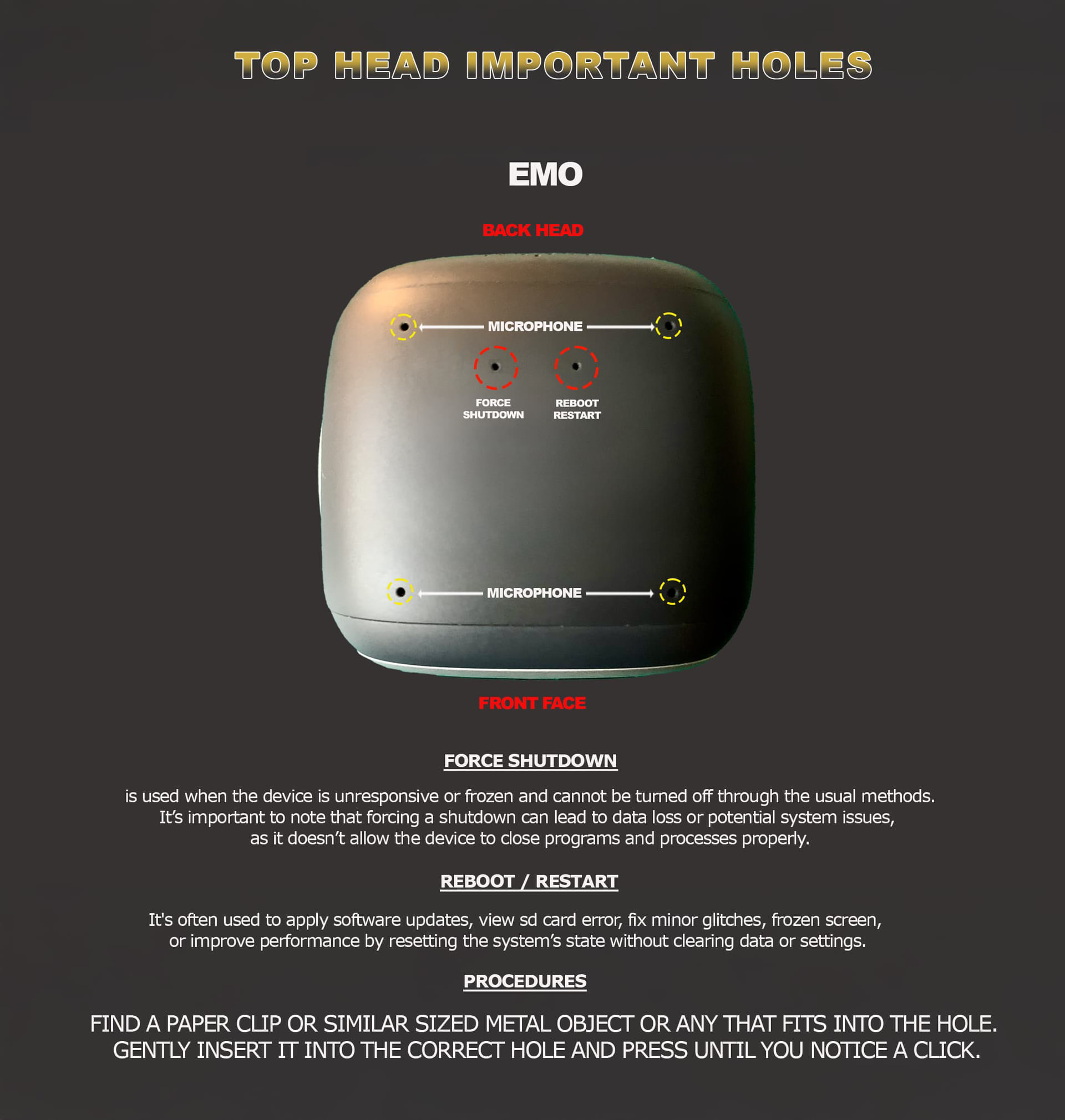
Step 3 — Poking Head Holes
-
Out of the charger, try poking the left-side hole while EMO is facing you, wait about 5 min. Then return him to his charger to reboot again.
-
Try poking the right-side hole a couple of times for about 5 sec. While EMO was on his charger, that might solve the issue.
When nothing works!
If EMO still:
- powers only on the base
- dies instantly off the base
The battery is almost certainly dead or disconnected internally.
This requires battery replacement (support repair).
If you want, tell me how old your EMO is — I can estimate how likely it is a battery failure vs hardware damage.
If you’ve already tried the possible solutions and nothing helped, you’ll need to contact Living.AI support using the link below and fill out all the required information. Please also include a short video showing the issue, along with the necessary details.
You may also contact them via email at service@living.ai and send the same information:
- Video of the problem
- Order number
- EMO ID
- Description of the issue