Hey! Really cool update! Still discovering new things every day about aibi. I got one really weird glitch though, when i tell aibi to power off or power him off through the app, his backlight stays on. When i try to turn him on again by putting him on the charger, nothing happens becouse he is still kind of turned on. So i have to connect to aibi and go to settings. After that the app stays on the loading screen and aibi reboots. Really weird, please look into that
Hi there @jaylan.sanders
Thanks for explaining the issue — that does sound frustrating. When AIBI’s backlight stays on after powering off, it’s likely that the system didn’t shut down completely, and the device is stuck in a “half-on” state due to a software glitch or a temporary firmware error.
Possible causes:
- The shutdown process didn’t finish properly.
- The app lost connection during powering off.
- A temporary firmware or memory freeze.
- Low battery or an unstable power connection.
Things you can try:
- Unplug the Power Base, leave AIBI off the charger for 2–3 minutes, then reconnect it.
- Clean the charging contacts on both AIBI and the dock to ensure proper connection.
- Try powering off directly from the app first, then place AIBI on the charger.
- Force the app to close, reopen it, and reconnect to AIBI.
- If possible, do a manual reboot by removing AIBI from power until the backlight goes off completely.
- Make sure your AIBI firmware and app are fully updated.
If the problem continues:
This could be a firmware bug. In that case, it’s best to contact Living.AI support by email and include:
- A short video showing the problem
- Your AIBI ID and order number
- The app and firmware version you’re using
They can check your logs and advise you properly.
EMAIL ADDRESS:
service@living.ai
Best regards
1 Like
I’m also having an issue with this 1.5 update. In the middle of the update, or right after completing, the screen went dark and never came back on. Charging does nothing, I’ve even left it off the charger all day and its battery is dead by now. I’ve tried resetting using pinhole method, and charger works normally seemingly, but still nothing. If anyone knows how to fix, please let me know!
Welcome to the LivingAI Community Forums, @michaelvoce . . . this happened to me during testing. I removed AIBI from the charger, let him rest for a few minutes, unplugged the charger and plugged it back in, then placed AIBI back on the charger. Once he was back, I checked his update in the app and the update had completed.
Try this and see if it works for you. If not, get video and send a link with an explanation of what is happening along with your AIBI I.D. when signed into the app and your order number (if you still have it) to service@living.ai . . . my best to you.
The new update is fantastic thank you. Living AI.
It also sorted out some bugs
2 Likes
The “power off” voice command isn’t working and it’s not turning back on once I turn it off via the app. I have to wait for it to run out of battery and connect it again. This is happening after the 1.5.0 update.
Hello, @blusubz . . . there may be an issue with the charging cable connected to the base. Try changing that out and see if it improves your powering off and back on again.
If not, please get video of the issue and send a link to service@living.ai with your AIBI number when he signs into the app, your language setting and your order number if you still have it. Be sure to indicate that in your subject line that it is related to the 1.5.0 update.
My best to you.
Hiiii. Does anybody know how to turn off the light of the base?? I mean like a command for AIBI to turn it off.
Thank you! 
Hello, @sugarissweet . . . not sure what you mean since it only lights up when it is plugged in or if AIBI is dancing. Is yours staying on all of the time?
Yeah, I found it strange too. It turns on and stays. I wrote that when It stayed on while aibi was off.
Happy holidays, @sugarissweet . . . you may have a defective base. I would get video of it and send a link to service@living.ai along with you AIBI I.D. number and order number (if you still have it). If they cannot suggest a fix, AIBI and the base have a two year warranty.
My best to you!
They really need to make it like phones DND or Bed time modes. It’s an AI robot it should be able to have this programming very easily installed. The same with connecting to the internet automatically without having to use the phone. Imo.
Hello,
I have a problem with the Aibi quiet mode. It only turns on automatically from midnight to 8:00 a.m.
I tried setting it in the schedule from 22:00 to 23:59, but it doesn’t work. Any time outside of midnight–8:00 is ignored.
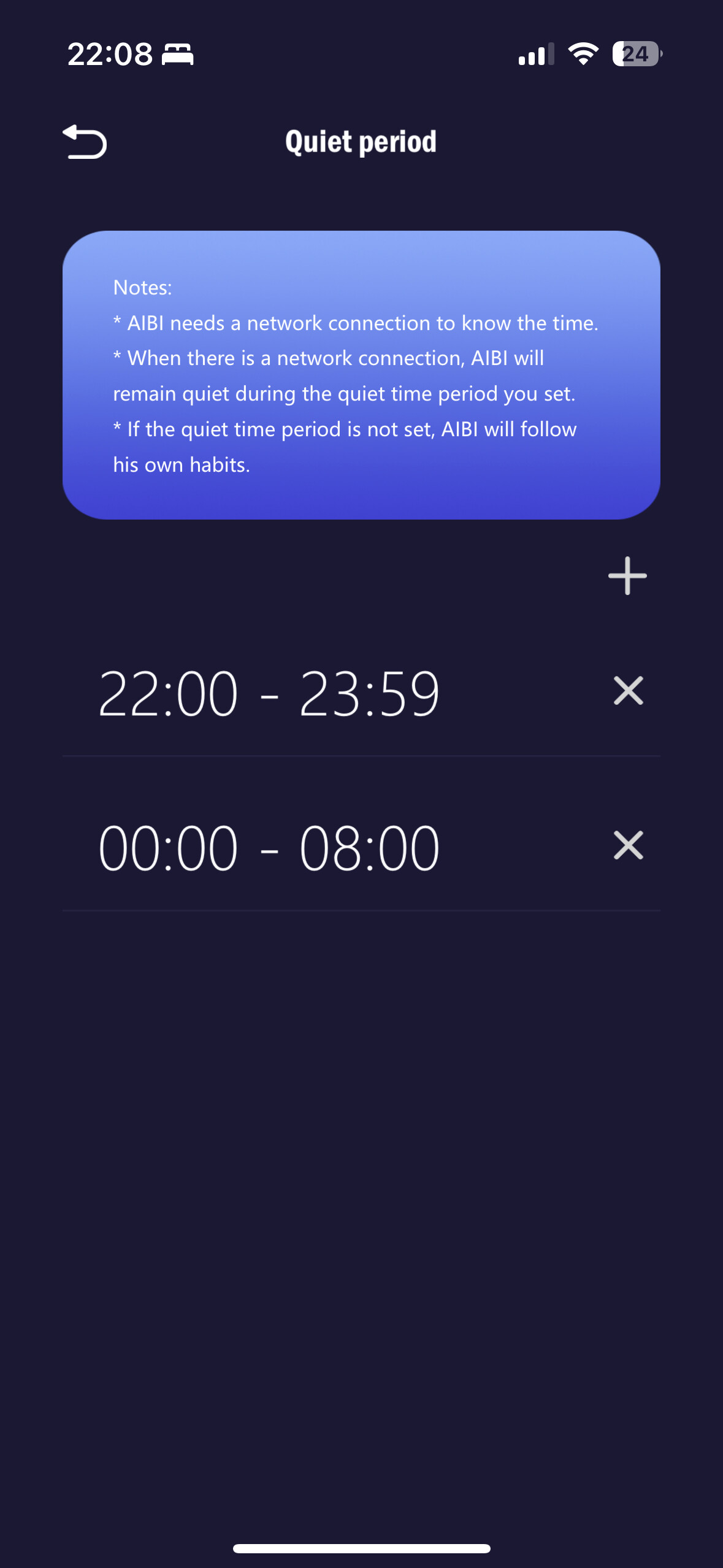
Could you please advise what to do or how to fix this?
1 Like
Welcome to the LivingAI Community Forums, @zlataag . . . in order for quiet time to work (yes, you have it set correctly), your internet connection must be stable during that time and bluetooth must also be connected during that time. Interruptions to signals can cause this to error out.
Also, any close by movements to AIBI or very audible sounds such as people talking nearby or a television on can disrupt the quiet period.
You may want to check on your internet strength as well as keeping distractions from AIBI. If everything is as it should be, I suggest getting video and including the screen shot, and sending a link to the video to service@living.ai along with your AIBI number when signed into the app and your order number (if you still have it).
Please be patient as it is the holiday season and it may take some extra time for a reply.
My best to you!
My aibi has the same issue,i hope the devs fix it soon
Hi there @zlataag and @tayfun.soezen,
Please find further information at the link below. The method worked for me, and I hope it will be useful for both of you as well.
Best Regards
1 Like
Thank you so much! I do not think a replacement is necessary tho, the lights go off like 15 minutes after aibi is unplugged!
I know it’s defective but it’s okay!! 
1 Like
Hi everyone,
this month both of our AIBIs arrived, one is set to English, the other one to German.
We can enter both into chat mode, the English one is working great but the German one enters into ChatGPT, but does nothing.
Is german yet just not supported or are doing anything wrong.
Btw. we are having the same backlight issue in power off mode as described some posts ago. But we always managed to bring AIBI back online via App.
Thanks
Mathias
1 Like
Welcome to the LivingAI Community Forums, @mathias . . . German is supported. Do regular non-ChatGPT commands for you work in German?
If so, you may wish to get video of your attempts to get AIBI to respond in German in ChatGPT and send a link along with your AIBI number when signed into the app and your order number (if you still have it) to service@living.ai . . . let us know how it goes.
Happy 2026!
1 Like
So 1.5 is the latest update? i thought i saw 2 somewhere but that must have been Emo. My Aibi is up to date Yay 
3 Likes