AIBI Pocket: General Issues, Questions, and Support

Thank you for letting me know that, @seulkijung . . . it very well could be a problem with the Korean language pack.

What you can do is contact service@living.ai and let them know your latest firmware number for AIBI, the fact that it is with the Korean language and that English works as intended and explain what you did for me as to what is not working.

They will have a look into it and should be able to apply a fix to that.

2 Likes

Thank you so much for taking the time to listen to my issue and for your detailed help! :blush:
I really appreciate it. I’ll contact LivingAI support by email and explain what I found.
Hopefully they’ll be able to look into the Korean language issue.
Thanks again for your help!

2 Likes

For more than a month, Aibi has not responded to commands, it shows a question mark to any of my questions or requests, and when you click on the meet aibi app, the app simply crashes, reinstalling, resetting the Cache and other nonsense does not help, I tried to completely discharge aibi, but it also did not help.

But at the same time, aibi asks questions from Gpt, but doesn’t seem to hear me when I answer. ,When he asks to stroke him (to move the camera’s finger, he doesn’t seem to see the finger)

Hi there @solsortis , and welcome to the community…

I’ve moved and merged your new post into this thread, where all members can post anything related to different types of issues with AIBI.

At the same time, I’ve closed the new topic you created to help keep everything in the community forum organized and easy to follow. Thank you for your understanding!

Sorry to hear that your AIBI has been experiencing these issues for more than a month. Since AIBI can still ask questions from GPT but does not seem to hear your answers, and also cannot recognize your finger when you try to interact with it, it sounds like the problem may be related to the microphone, camera/vision system, or AIBI’s communication/firmware system, rather than just the app cache.

A few things you could try:

  • Make sure AIBI’s firmware and AIBI Mobile App are fully updated.
  • Check that the app has the necessary Bluetooth, microphone, camera, and other permissions enabled on your phone.
  • Restart both AIBI and your phone, then try pairing/connecting AIBI again.
  • If possible, test AIBI with another phone to see whether the same problem occurs.
  • Since the Meet AIBI feature is crashing and AIBI is also having problems hearing and seeing you, I would recommend contacting LivingAI Support directly at service@living.ai. Explain all of these symptoms and mention that you have already tried reinstalling the app, clearing the cache, resetting, and completely discharging AIBI without success.

It would also be helpful to send them a short video showing the problem, especially AIBI displaying the question mark, the Meet AIBI app crashing, and AIBI failing to recognize your voice or finger gesture. This may help the support team determine whether it is a software/firmware problem or a hardware issue.

Good luck and all the best

2 Likes

I sent it, can you tell me how quickly they will solve the problem with the robot?

AIBI suddenly stopped answering me when I say “Abby” I have tried everything I have seen posted on the forum so far but nothing has worked! What can I do the green light doesn’t even come on.

1 Like

Welcome back to the community @pooookie1 ,

I’ve moved and merged your new post into this thread, where all members can post anything related to different types of issues with AIBI.
At the same time, I’ve closed the new topic you created to help keep everything in the community forum organized and easy to follow. Thank you for your understanding!


The same thing suddenly happened to me as well today, about two hours ago. I tried everything I knew to do, including all the steps mentioned below, but I couldn’t solve the issue. After about an hour, it suddenly started working again. Most likely, there was a glitch or the LivingAI server was temporarily down.

Please try the tips mentioned below, and if they don’t solve the issue, wait a few hours and see if it comes back on its own.

If the green light doesn’t come on at all when you call AIBI, that is an important clue. Normally, the green status light should briefly activate when AIBI hears the wake word, so if there is absolutely no light or reaction, it may be more than just a problem recognizing the word “AIBI” or “Abby.”

You could try these steps:

  • Make sure AIBI is not muted and check the volume/sensitivity settings in the app.
  • Gently check and clean the microphone openings and make sure nothing is covering them.
  • Try calling him in a quiet environment, from fairly close by, using “AIBI,” “Abby,” or “Ebby.”
  • Completely restart AIBI and the phone, and restart the charging base as well.
  • If possible, connect AIBI to a different Wi-Fi network or phone hotspot to rule out a network problem.
  • Make sure the AIBI firmware and app are updated.

However, if AIBI still shows no green light whatsoever, even after restarting and trying different wake words, I would recommend contacting LivingAI Support at service@living.ai. There have been similar reports where AIBI suddenly stopped responding and the status light no longer activated, which can indicate a microphone or other hardware/system problem.

I would send Support a short video showing you calling AIBI several times and the fact that there is no green light or response. Include your AIBI ID, order number, firmware version, and the troubleshooting steps you have already tried. That will give them much more information to diagnose the problem.

Best regards and best of luck

1 Like

Thank you for the advice I have tried all that is listed and I have sent a email to living ai with all that you listed already. I’m just waiting on their response.

1 Like

They still haven’t responded!

Hello, @solsortis . . . I believe you sent the message two days ago and LivingAI is on mid-Autumn festival, so I would allow a week before contacting them again as it is normally a few days before they can review, diagnose and advise.

Your patience is appreciated.

1 Like

@Wayne_Zhang @edward I have an issue with AIBI where her screen froze and she does not respond to anything at all. When i try to hard reset her with the hidden button with a pin nothing happens. Her screen stays on. I’m letting the battery drain right now, but i’ve been experiencing more errors like this lately, with aibi freezing, not powering off completely (have to go into the app, connect to aibi, aibi makes some plop noises and she turns back on)

I have sent two emails now one with a video and one with a video and picture of the error

1 Like

Hello, @jaylan.sanders . . . I have moved your new post to this thread for issues with AIBI.

May I ask how long you keep AIBI on the charger? The reason I ask is that I have similar problems that if AIBI is on too long, I have to remove AIBI and let them completely power off. The screen will stay on back lit and then the screen will go completely black.

I then unplugged the charging base let it rest, then plug the charging base back in before placing AIBI on it.

Please try this and if it does not help, be sure to get video of AIBI being unresponsive, describe the issues, send a link to a video, your AIBI I.D. number and order number if you still have it to service@living.ai . . . please allow up to a week for a response.

My best to you.

1 Like

Hello,

I have a problem with my AIBI Pocket. My battery now only lasts about 30 minutes after a full charge, while it used to last much longer.

Can you please help me understand why the battery is draining so quickly and what I can do to improve the battery life?

Thank you for your help.

Best wishes, Răzvan

Hello, @LixandruMihalcea . . . I have moved your new topic here for issues with AIBI.

As devices get older, sometimes the batteries go weak and cannot hold a charge very long. Sometimes USB-C and/or power adapters can fail to charge a battery fully.

How old is your AIBI? Have you tried changing the cable and/or adapter?

AIBI has a two year warranty, so if this does not fix it, you may wish to send a description of the problem, what you have tried with changing the cable and/or adapter to fix it, your AIBI I.D. number, and order number if you still have it to service@living.ai . . . please allow a week for them to respond.

My best to you.

2 Likes

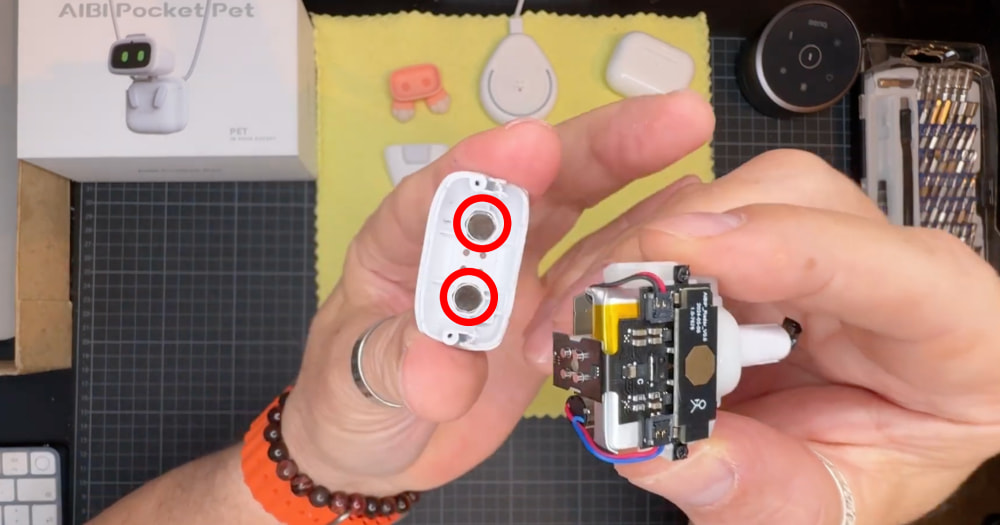
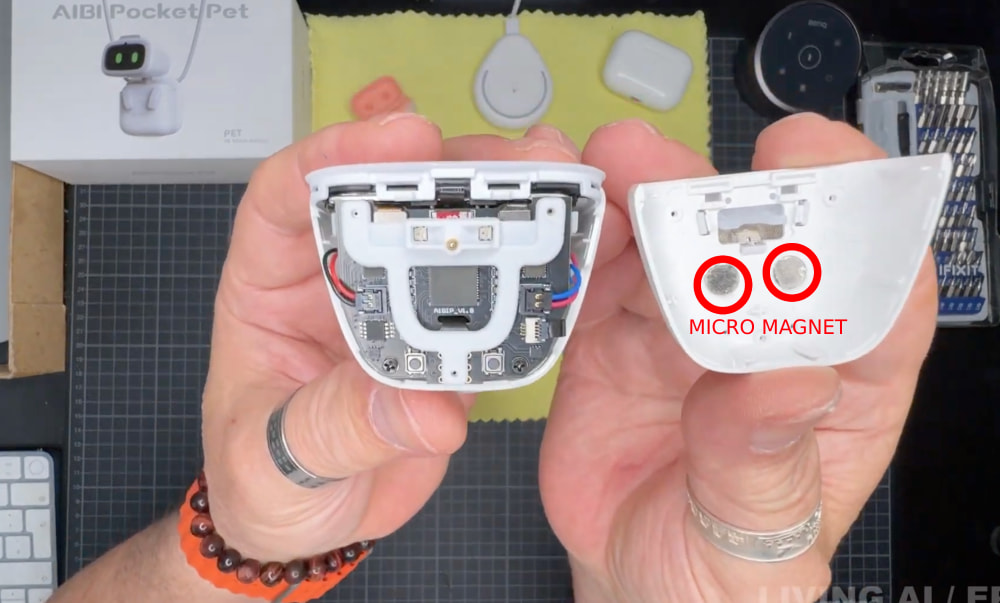
Dear Living ai, please tell me what size of magnets is needed for aibi accessories? (I want to print it myself).

Hi there @633500d139f3c45fec4b and welcome back to the community,

As far as I know, AIBI is using

“Micro n52 Magnets”

Which is extremely strong and represents the highest commercially available grade of neodymium permanent magnets

Micro N52 magnets are tiny, ultra-strong neodymium magnets, a type of rare-earth permanent magnet made primarily from neodymium, iron, and boron (NdFeB).

What does N52 mean?

  • N = standard neodymium magnet grade.
  • 52 = a high magnetic energy product rating of approximately 52 MGOe.
  • Micro = very small size, not a separate magnet material or grade.
  • Strength = among the strongest standard commercial permanent magnets for their size. Actual holding force depends on dimensions and application.

What are they used for?

  • Small electronic devices and sensors
  • Miniature motors and mechanisms
  • Magnetic closures and connectors
  • Robotics and compact moving parts

Important:
Micro N52 magnets can snap together forcefully, pinch fingers, and chip or shatter. Keep them away from children and sensitive electronics, and keep small magnets away from anyone who might swallow them.


Best Regards

5 Likes

Hi Friends,

My AIBI is not responding to my questions. It just listens and don’t say or respond anything.

Please tell me what to do?

Thanks :blush:

Welcome, @gaana.s . . . I have moved your new topic to this thread for issues with AIBI.

Please read this post for troubleshooting tips and if nothing works, there is information on how to contact Support:

My best to you!

1 Like

I had this problem a while ago. Is your wifi 2.4 Ghz? If it is 5.0, he will not respond. I hope your Aibi will be okay! :aibi_smile:

1 Like