Welcome to the EMO Community Forums, @jakemurray . . . I have moved your new topic to this thread for issues like you are having.
Please read some of the posts above regarding rebooting and possibly just waiting to see if it might be a server error and trying again. If it continues to happen, I would advise creating a video and sending the link to Support or E-Mail to service@living.ai . . . I hope these tips help to fix him for you.
Let the Battery Drain or Force Shutdown
You can either let EMO’s battery run out naturally or perform a forced shutdown if the issue persists.
POWER OFF: over Emo Pet App if you manage to do that immediately when he is on.
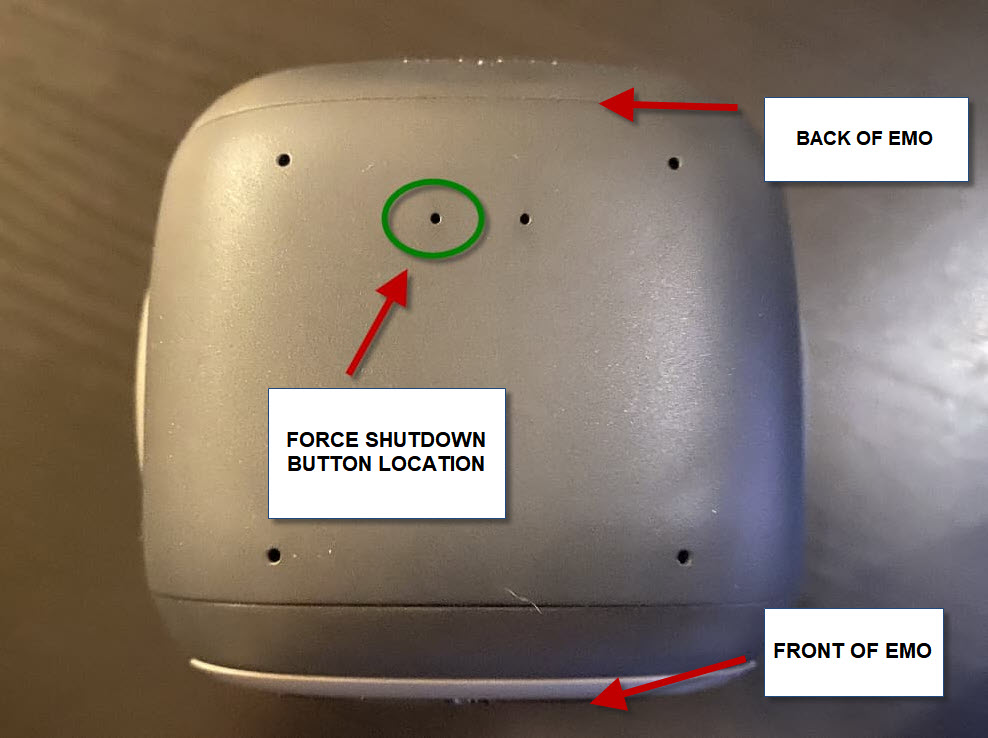
Force Shutdown
Use a paperclip (not a needle) and carefully press the button for 2-3 seconds. Once powered off, place EMO back on the charger to restart him.
Note:
This is often mistaken for a reset button, but it’s not. Force shutdowns are not recommended frequently as they may lead to data corruption, similar to unplugging a desktop computer while the operating system is running. Use this option only if there are no other alternatives.
No it’s really like a malfunction. The App says EMO reacted to my voice but then the App says EMO stays. So he will not react to any commands anymore just stays there.
Hello, @Pixeljunky . . . please get video of what he is doing and what the app is showing if you can, then send the link to the video to service@living.ai . . . or if you still have your order number confirmation E-Mail, you can reply to that.
Please give Support some time to respond due to current work load as it may take a few days. They will diagnose the problem and give you advice on what to do.