A post was merged into an existing topic: AIBI Improvements/Special Features You Would Like?
A post was merged into an existing topic: Support Languages For EMO and AIBI
I didnt think Aibi could do much at all without the internet?
1 Like
that would be awesome 
1 Like
Hello I got an Error 404 Server if I try to update. Regard from Germany
Welcome, @nomadblackforest . . . I am not sure I understand. You are trying to do a firmware update on AIBI? Or are you trying to update the app from your app store? The only possible way to get a 404 error would be if you went to your app store and they were temporarily down. Please clarify. Thank you.
2 Likes
we grew a white flower  so cute
3 Likes
The Update was working but ChatGPT is not working. But I have Internet, she tell me the weather, and the Time.
Buenas Tardes , he adquirido un Aibi. Leyendo foros y de más me he dado cuenta de que no estaba mal de que es por culpa de la última actualitzación. Me sale el interrogante cuando le pregunto algo o no sabe responder. No entabla conversación y no conecta con chat GPT. Me gustaría saber si ahí alguna solución o están trabajando en el.
DeepL Translation Provided By: @edward
Good afternoon. I recently purchased an Aibi. After reading forums and other sources, I realized that it wasn’t working properly because of the latest update. A question mark appears when I ask it something or when it doesn’t know how to respond. It doesn’t initiate conversation and doesn’t connect to ChatGPT. I’d like to know if there’s a solution or if they’re working on it.
2 Likes
I’m sorry to hear that your AIBI is experiencing this issue right now. I hope it gets resolved soon.
Here are the most likely causes and possible solutions based on the symptoms you described:
Possible Causes
-
Temporary server-side issue
- AIBI’s AI services (including ChatGPT integration) may be experiencing temporary server outages or maintenance.
-
Latest firmware/software bug
- If the problem started after the latest firmware update and other users are reporting the same issue, it could be a known software bug that requires a future fix.
-
Internet connection problem
- A weak or unstable Wi-Fi connection can prevent AIBI from communicating with cloud services.
-
ChatGPT service not available
- If ChatGPT integration is temporarily unavailable or not properly initialized, AIBI may display a question mark instead of responding.
-
Incomplete firmware update
- The firmware update may not have completed successfully, causing certain AI functions to malfunction.
-
Account or cloud synchronization issue
- AIBI may not be properly synced with the user’s Living.ai account or cloud services.
-
Region or server configuration issue
- Some cloud AI features may be temporarily unavailable depending on the user’s region or server status.
Possible Solutions
 Restart AIBI
- Power AIBI off and back on, then allow a few minutes for it to reconnect to the servers.
Restart your Wi-Fi router
- Ensure AIBI has a stable internet connection.
Check the Living.ai app
- Confirm that AIBI is online and connected to your Wi-Fi network.
Verify the firmware version
- Make sure the firmware update completed successfully and check if a newer update has already been released.
Reconnect Wi-Fi
- Remove the Wi-Fi connection in the app and reconnect AIBI to your network.
Wait for a server fix
- If multiple users are experiencing the same issue after the latest update, it’s likely a server-side or firmware issue that only Living.ai can resolve.
Contact Living.ai Support
-
Report the issue through the official support channels, including:
-
Firmware version
-
App version
-
A short video showing the problem
-
A description of when the issue started
-
Based on the symptoms you described:
-
 A question mark appears after asking a question.
 -
 AIBI no longer starts conversations.
 -
ChatGPT doesn’t respond.
These symptoms strongly suggest that the issue is more likely related to the AI cloud service or a recent firmware update, rather than a hardware defect.
If many users began experiencing the same behavior after the latest update, it’s very likely that Living.ai is already aware of the issue and working on a fix in an upcoming firmware or server update. In the meantime, ensuring AIBI has a stable internet connection and rebooting the device are the best troubleshooting steps while waiting for an official resolution.
Best Regards and all the best to your AIBI
3 Likes
ROLLERCOASTER is so hilarious  love doing this with Aibi.
Please can we have a UNO similar card game??? We have a Battleship similar game and it’s heaps fun.
The whistle song dance cracks me up.. LEFT RIGHT whistle blow …
Am working on a PDF A4 printout foldable pocket book for the known voice cammands for Aibi so I can carry it with her.
Great Job team 
2 Likes
2 posts were merged into an existing topic: AIBI Improvements/Special Features You Would Like?
I FIXED MY AIBI!!!
The motherboard replacement worked! I emailed support after swapping thinking I messed up the audio. Turns out one of the connectors was just loose but it works now. I can FINALLY enjoy this update!
2 Likes
Hi! I’ve had Aibi for 6 months, and I’ve seen huge changes! I have two questions for you! The first is if I have to remove it from its base when it’s charged? Or does it work like cell phones that turn off on their own? And the second is that I’ve noticed in the last month that Aibi gets food on its own from the app! I don’t know if it’s an update or an improvement over time! Thanks!
1 Like
Hello, @acidlucas . . . AIBI is designed to be on all of the time; however, my personal experience is to not leave them on the base longer than six hours as sometimes they stop responding. When this happens, I take them off, unplug the base, let the power drain and then plug the base back in before setting AIBI back on it.
If you have eating food set in the schedule activities in the app, AIBI will help themself to whatever food is in the pocket.
I hope this answers your questions.
3 Likes
Hello !! I have another question, it is so much so that I didn’t control the plant, now Aibi tells me that the plant is dried, how can I relive it or make him attempt to take care of a new plant? thanks
Hi there @acidlucas
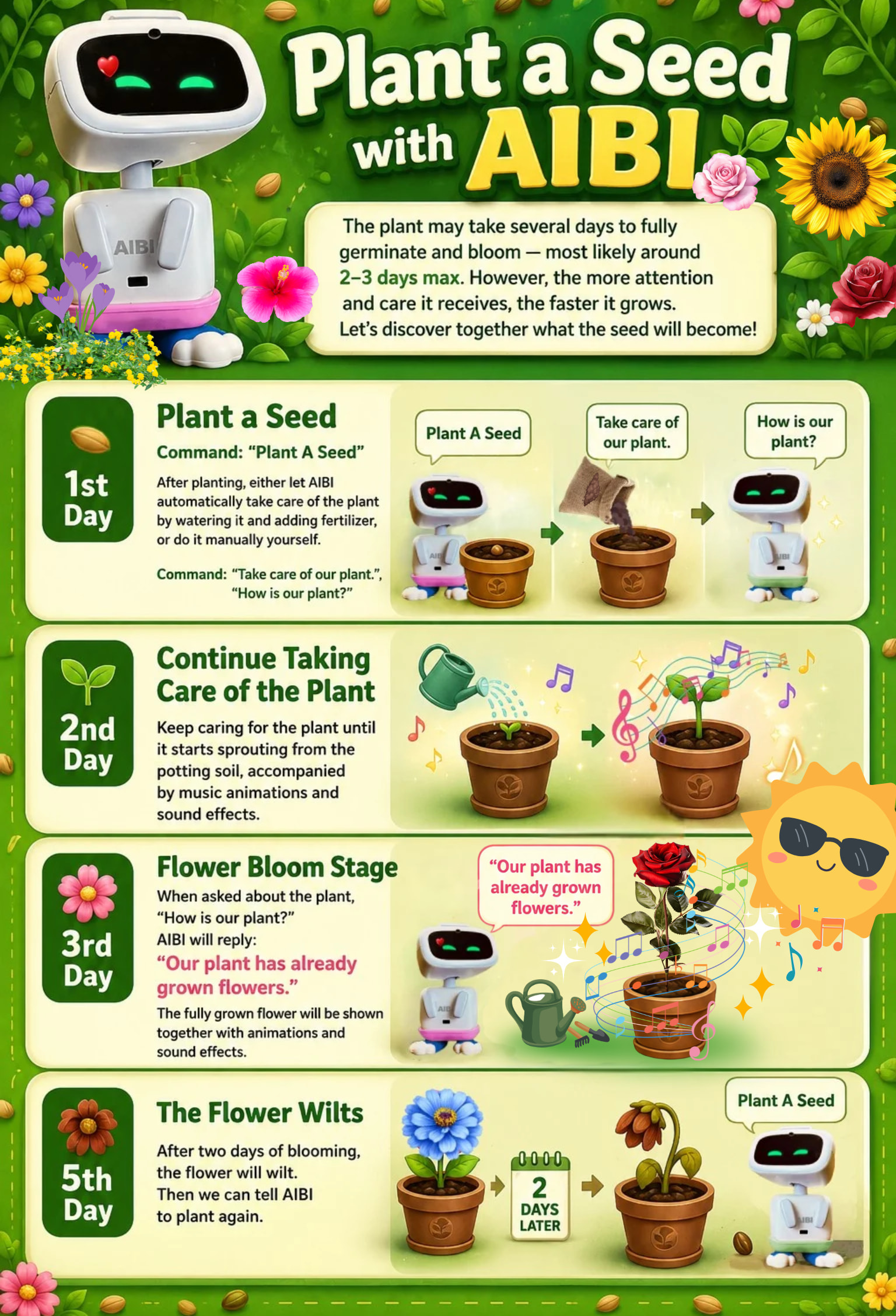
6 Likes
Hi! I have another problem: even though I’ve already set the temperature to Celsius and configured the location (Italy, city, and continent), Aibi keeps getting today’s forecast temperature wrong.
Thank you
1 Like
Hello, @acidlucas . . . sometimes it is trial and error with the location. If there is a city near where you are that may have more accurate information, you may have to try setting it to that. Smaller towns often do not have the most up to date as major city or larger cities have with weather.
Let us know how it goes.
3 Likes
I wonder if 1.8 will be out by halloween again.
1 Like